
AI document analysis sounds like magic until you realize top models scoring 99% accuracy on benchmarks can suddenly drop to 50% on distorted scans or handwritten notes. This gap between controlled tests and messy real-world documents reveals why understanding both AI strengths and limitations matters for your productivity. Whether you're processing invoices, extracting research data, or automating compliance checks, knowing which AI methods work when and where human oversight remains critical separates efficient workflows from costly errors. This guide explores core AI methodologies powering document understanding, benchmark performance versus real-world challenges, expert strategies for hybrid human-machine pipelines, and practical advice to deploy AI document analysis that genuinely improves accuracy and cuts processing time.
Table of Contents
- Key takeaways
- What is AI document analysis and how does it work?
- Core AI methodologies powering document analysis
- Performance benchmarks and challenges in real-world document AI
- Expert nuances, best practices, and practical advice for leveraging AI document analysis
- Discover Sofia🤖: your AI-powered personal assistant
- Frequently asked questions about AI in document analysis
Key Takeaways
| Point | Details |
|---|---|
| Hybrid pipeline approach | AI document understanding relies on multi stage pipelines that combine ingestion normalization classification OCR extraction validation and human review to improve accuracy. |
| Edge case gaps | Top models may achieve high benchmark scores but can stumble with distorted scans handwritten notes and other messy inputs. |
| Human in the loop | Human oversight remains critical to handle errors and provide audit trails. |
| Benchmarks and confidence metrics | Custom domain benchmarks and calibrated confidence scores improve reliability and guide escalation when needed. |
| Deployment boosts efficiency | Practical AI deployment reduces processing time and boosts accuracy in real world workflows. |
What is AI document analysis and how does it work?
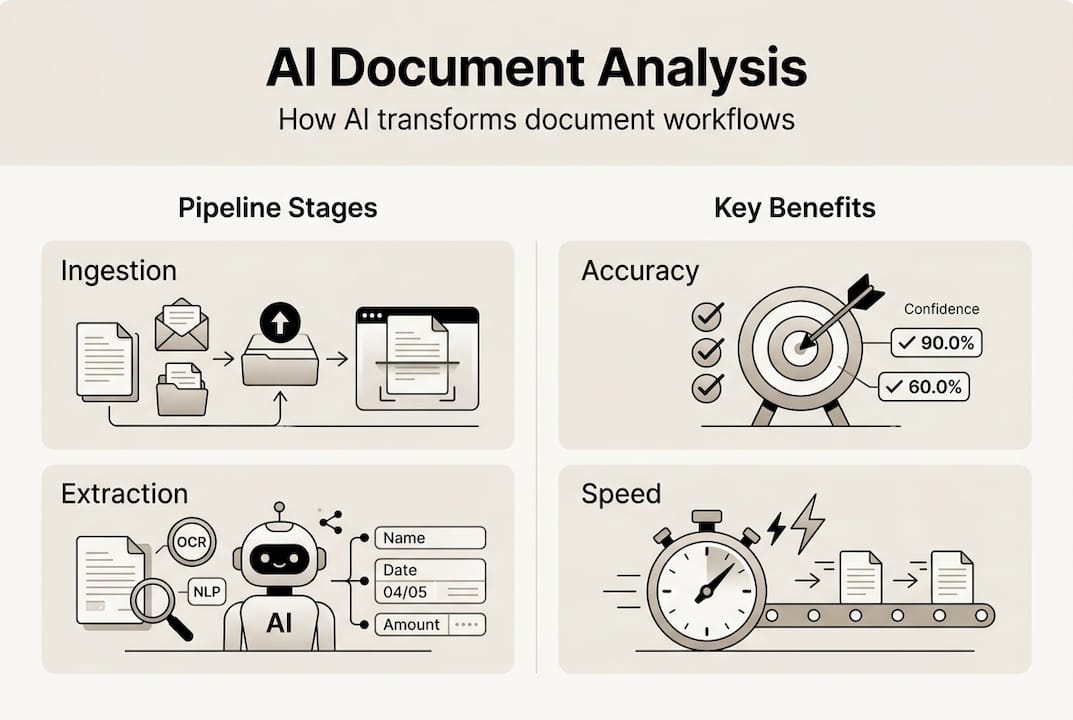
Document AI, also called Intelligent Document Processing, transforms unstructured documents into structured, actionable data using machine learning. The goal is extracting information from invoices, contracts, forms, reports, and research papers faster and more accurately than manual processing. AI document analysis employs multi-stage pipelines including ingestion, normalization, classification, OCR, extraction, validation, with human-in-the-loop for uncertain cases.
The typical pipeline starts with document ingestion where files arrive in various formats like PDF, images, or scanned documents. Normalization converts these into standardized formats for processing. Classification sorts documents by type, whether invoices, contracts, or medical records, routing each to specialized extraction models. Layout-aware OCR then recognizes text while preserving spatial relationships, understanding that a number in the top right corner likely represents a date or invoice number rather than random data.
Key-value extraction identifies field pairs like "Total: $5,000" while table extraction captures rows and columns of structured data. Entity recognition finds names, dates, amounts, and domain-specific terms. Validation checks extracted data against business rules, flagging anomalies for review. When confidence scores fall below thresholds, human-in-the-loop workflows route uncertain cases to specialists for verification, creating feedback loops that improve model accuracy over time.
OCR and layout understanding form the foundation because document structure carries meaning. A column of numbers beside product descriptions signals a pricing table, not random text. Modern systems combine traditional OCR with vision-language models that understand spatial relationships, making them effective for complex layouts like image analysis AI guide applications.
Common document types processed include:
- Financial documents like invoices, receipts, bank statements, and tax forms
- Legal contracts, agreements, and compliance documents requiring precise extraction
- Medical records, prescriptions, and insurance claims with specialized terminology
- Research papers and technical reports needing citation and data extraction
- Forms and applications with structured field layouts
Hybrid human-machine workflows handle uncertainty by routing low-confidence predictions to human reviewers. This approach maintains accuracy while automating routine cases, balancing speed with reliability. Understanding this pipeline helps you identify where AI excels and where human expertise remains essential, similar to principles in AI content creation guide workflows. The AI document analysis revolution continues reshaping how organizations process information.
Core AI methodologies powering document analysis
Three main AI approaches drive modern document analysis, each with distinct strengths. Vision-language models combine image understanding with text processing, learning spatial relationships between visual elements and semantic content. These models excel at layout understanding, recognizing that text position, font size, and proximity to other elements convey meaning beyond the words themselves. Core methodologies include vision-language models for layout understanding, active learning for model improvement, traditional ML for structured extraction, and LLMs for unstructured reasoning with hybrid approaches preferred.

Traditional machine learning handles structured data extraction efficiently. Classification models sort documents by type with high accuracy. Named entity recognition identifies specific fields like dates, amounts, and account numbers. These deterministic approaches provide audit trails, showing exactly why the model made each decision, which matters for compliance and debugging.
Large language models like GPT-4o tackle unstructured text tasks where context and reasoning matter. Summarizing lengthy contracts, answering questions about document content, or extracting nuanced information from varied formats showcases LLM strengths. However, LLMs can hallucinate facts when lacking context, requiring careful prompt engineering and validation.
Vision-language models for document AI categorize methods by feature fusion, model architectures like LayoutLM and UDOP, and pretraining objectives that teach spatial and semantic understanding together. Active learning continuously improves models by identifying uncertain predictions, routing them to human reviewers, then retraining on corrected examples. This feedback loop adapts models to your specific document types and edge cases.
Hybrid AI pipelines combine these approaches strategically. Use traditional ML for high-confidence structured extraction where auditability matters. Deploy vision-language models for complex layouts requiring spatial reasoning. Apply LLMs for unstructured tasks like summarization or question answering. This layered strategy balances performance with explainability, similar to real-time AI advantages in other domains.
Key methodologies include:
- Vision-language pretraining teaching models spatial-semantic relationships
- Multimodal transformers processing text and layout features simultaneously
- Template-based extraction for standardized document formats
- Graph neural networks modeling document structure as connected elements
- Ensemble methods combining multiple models for robust predictions
Pro Tip: Choose hybrid pipelines over single-model approaches for business-critical documents. Traditional ML handles routine structured extraction with full audit trails. Vision-language models tackle complex layouts. LLMs process unstructured reasoning tasks. This architecture lets you balance automation speed with compliance requirements while maintaining explainability for stakeholders.
Understanding visual reasoning models and document AI benchmarks helps evaluate which methodologies fit your use cases. Each approach trades off speed, accuracy, and interpretability differently.
Performance benchmarks and challenges in real-world document AI
Benchmark performance reveals both impressive capabilities and hard limits. AI models reach 99.16% accuracy on DocVQA validation; VLMs outperform traditional OCR; top IDP leaderboard scores reach approximately 83% overall. These numbers reflect controlled test sets with clean, well-formatted documents. Real-world performance tells a different story.
| Benchmark | Top Model Score | Document Type | Key Challenge |
|---|---|---|---|
| DocVQA | 99.16% | Visual question answering | Requires spatial reasoning |
| DSL-QA | 95.8% | Document structure learning | Complex layouts |
| IDP Leaderboard | 83% overall | Mixed enterprise docs | Varied formats and quality |
| FUNSD | 91.2% | Form understanding | Noisy scanned forms |
Performance drops 20-50% on wild documents with distortions, complex tables, handwriting; LLMs hallucinate on long contexts without chunking. Handwritten notes, degraded scans, unusual fonts, and multi-column layouts challenge even top models. A pristine invoice scanned at 300 DPI gets processed flawlessly. That same invoice crumpled, coffee-stained, and scanned at an angle might yield 50% extraction accuracy.
Complex tables with merged cells, nested headers, or irregular spacing cause bottlenecks. Models trained on standard grid layouts struggle when table structure varies. Multi-page documents with inconsistent formatting across pages create context management problems. LLMs processing long documents without proper chunking strategies lose track of earlier content, leading to hallucinated facts contradicting earlier sections.
Common failure modes include:
- Misaligned OCR on rotated or skewed scans
- Confused field extraction when layouts deviate from training data
- Hallucinated values filling missing fields with plausible but incorrect data
- Table structure errors on merged cells or irregular grids
- Context loss in long documents exceeding model token limits
"AI document analysis achieves remarkable accuracy on clean, standardized documents but requires human oversight for edge cases, complex layouts, and quality assurance. The gap between benchmark performance and real-world reliability demands hybrid workflows that route uncertain predictions to human reviewers."
These challenges explain why hybrid human-machine workflows outperform fully automated systems in production. Routing low-confidence predictions to specialists maintains accuracy while automating routine cases. Similar patterns appear in image analysis AI guide applications where edge cases require human judgment.
Pro Tip: Implement confidence score monitoring to identify when AI predictions become unreliable. Set thresholds based on your accuracy requirements and route low-confidence cases to human review. Track performance by document type and quality to identify where models need retraining or where manual processing remains more reliable than automation.
Expert nuances, best practices, and practical advice for leveraging AI document analysis
Experts diverge on optimal architectures. Some advocate tree-based representations modeling document hierarchy explicitly, while others prefer agentic flows where specialized models collaborate on large documents. Hybrid pipelines and human oversight are needed to manage brittle AI on unstructured or wild documents. The consensus favors hybrid approaches combining deterministic rule-based extraction for structured fields with ML models for variable content.
Tree-based systems excel at hierarchical documents like contracts with nested sections. Each node represents a document element with parent-child relationships capturing structure. Agentic flows work well for complex multi-page documents where different specialists handle distinct sections. A contract might route signature pages to one model, financial terms to another, and legal clauses to a third, then synthesize results.
Domain-specific benchmarks matter more than general leaderboards. A model scoring 99% on generic document QA might achieve only 70% on your specialized medical forms or legal contracts. Build custom test sets reflecting your actual document distribution, including edge cases and quality variations. This reveals true production performance better than public benchmarks.
| AI Method | Strengths | Weaknesses | Best Use Cases |
|---|---|---|---|
| Traditional ML | Fast, auditable, reliable on structured data | Struggles with varied layouts | Standardized forms, invoices |
| Vision-Language Models | Excellent layout understanding, handles complex formats | Computationally expensive, requires large training data | Mixed layouts, visual reasoning |
| LLMs | Flexible reasoning, handles unstructured text | Hallucination risk, expensive, slow | Summarization, Q&A, varied formats |
| Hybrid Pipelines | Balances speed, accuracy, auditability | More complex to build and maintain | Production systems requiring reliability |
Best practices for implementation include:
- Establish confidence thresholds routing uncertain predictions to human review
- Version control training data, models, and extraction rules for reproducibility
- Monitor performance by document type and quality tier separately
- Implement feedback loops where human corrections retrain models
- Maintain audit trails showing extraction logic for compliance
- Test on representative samples including edge cases before full deployment
Practical gains from well-implemented AI document analysis include 60-90% processing time reduction compared to manual review. Accuracy improvements depend on baseline quality but typically show 20-40% fewer errors when hybrid workflows catch AI mistakes. Cost savings come from reallocating human effort from routine extraction to exception handling and quality assurance.
Pro Tip: Set up human-in-the-loop workflows for edge cases before automating routine documents. Identify your most challenging document types and quality issues. Route these to specialists while automating clean, standardized cases. Gradually expand automation as models improve through active learning, maintaining quality without sacrificing reliability.
Leveraging real-time AI advantages and exploring AI document processing alternatives helps optimize your technology stack. Different tools excel at different document types and workflows.
Discover Sofia🤖: your AI-powered personal assistant
Implementing intelligent document processing requires robust AI infrastructure that adapts to your specific needs. Sofia🤖 provides access to over 60 state-of-the-art AI models including GPT-4o, Claude 4.0, and Gemini 2.5 in a single platform, enabling you to process PDFs and images with advanced document analysis capabilities. Whether you're extracting data from invoices, analyzing research papers, or automating compliance workflows, Sofia🤖's real-time streaming responses and team collaboration features streamline document processing.
The platform prioritizes security through GDPR compliance and enterprise encryption while offering flexible plans for individual users, teams, and large enterprises. Custom AI profiles let you tailor document analysis workflows to your specific document types and accuracy requirements. Explore Sofia AI-powered assistant to discover how advanced AI models can transform your document processing efficiency and accuracy.
Frequently asked questions about AI in document analysis
What documents benefit most from AI analysis?
Standardized forms like invoices, receipts, and tax documents benefit most because consistent layouts let AI models achieve high accuracy with minimal training. Financial statements, insurance claims, and shipping documents with predictable structures also see strong results. Research papers and contracts with varied formats require more sophisticated models but still gain efficiency from automated extraction.
How do hybrid AI-human workflows improve accuracy?
Hybrid workflows route low-confidence predictions to human reviewers, catching AI errors before they propagate downstream. This maintains accuracy on edge cases while automating routine documents. Human corrections feed back into training data, continuously improving model performance through active learning. The result is higher overall accuracy than either fully automated or fully manual processing.
What are common pitfalls of AI document analysis?
Over-reliance on benchmark scores without testing on your specific document types leads to disappointing production performance. Ignoring confidence scores and automating everything creates error propagation. Insufficient training data for edge cases causes models to fail on unusual formats. Lack of human oversight for quality assurance allows hallucinations and extraction errors to reach end users.
How to measure AI reliability in document processing?
Track accuracy by document type and quality tier separately, not just overall averages. Monitor confidence score distributions to identify when models become uncertain. Measure false positive and false negative rates for critical fields. Compare AI extraction against human review on random samples. Track how often low-confidence cases routed to humans get corrected versus confirmed.
Can AI handle handwritten or degraded documents effectively?
AI struggles with handwritten and degraded documents compared to clean printed text. Performance drops 20-50% on distorted scans, unusual handwriting, or low-quality images. Specialized models trained on handwritten text perform better but still require human review for critical applications. Preprocessing steps like image enhancement and deskewing improve results but don't eliminate the accuracy gap versus clean documents.