
Manual document review drains hours from your team's day while introducing costly errors into critical business processes. Juggling hundreds of contracts, compliance documents, or legal files without automation leaves professionals buried in repetitive tasks and vulnerable to oversight. AI-powered workflows combined with human-in-the-loop oversight offer a smarter path forward, automating routine screening and coding while preserving the judgment needed for complex decisions. This guide walks you through preparing, executing, and optimizing AI-assisted document review workflows that balance speed with accuracy, helping you reclaim time and improve collaboration across your organization.
Table of Contents
- Preparing For AI-Powered Document Review Workflows
- Executing The AI And Human-In-The-Loop Document Review Process
- Verifying Results And Optimizing Ongoing Document Review Workflows
- Simplify Your Document Review With Sofia🤖 AI Assistant
- Frequently Asked Questions
Key takeaways
| Point | Details |
|---|---|
| Integrate AI for initial screening | Automate routine document coding and summarization tasks to reduce manual workload by up to 95%. |
| Use human-in-the-loop for quality | Route ambiguous or high-stakes documents to human reviewers to catch errors AI might miss. |
| Implement workflow best practices | Iterate prompts continuously, enforce security controls, and train teams on AI capabilities and limitations. |
| Leverage collaboration features | Centralize document repositories, automate notifications, and assign role-based access to streamline teamwork. |
| Balance efficiency with judgment | Combine AI speed with human oversight to maximize productivity while maintaining defensibility and accuracy. |
Preparing for AI-powered document review workflows
Successful AI integration starts long before you process your first document. You need a foundation of team readiness, refined prompts, and security protocols to ensure your workflow delivers reliable results without introducing new risks.
Begin by educating your team on what AI can and cannot do. Training sessions should cover the strengths of automation, like rapid pattern recognition across thousands of pages, and the limitations, such as struggles with ambiguous language or scanned handwriting. When everyone understands these boundaries, they can better judge when to trust AI outputs and when to escalate to human review.
Next, develop and iterate your prompt instructions using sample documents that represent the variety you'll encounter in production. Test prompts on contracts with different clause structures, invoices with varying formats, or compliance filings from multiple jurisdictions. Refine your instructions based on accuracy rates and edge cases until the AI consistently delivers usable results. Implementing HITL workflows means starting with samples, iterating prompts, and training teams while prioritizing integration and security.
Establish security and access controls that align with your compliance requirements. Define who can upload documents, who reviews AI outputs, and who approves final decisions. Encryption, audit trails, and role-based permissions protect sensitive information while maintaining accountability. These controls become especially critical when handling confidential contracts or regulated data.
Define roles and responsibilities to integrate AI and human reviewers effectively. Assign team members to monitor AI performance, validate edge cases, and provide feedback for prompt improvements. Clear ownership prevents gaps where errors slip through and ensures continuous learning from both successes and mistakes.
Test AI outputs on varied document types before full deployment. Run pilot reviews on a subset of your document backlog, comparing AI results against manual reviews to measure accuracy and identify patterns where human oversight adds the most value. This testing phase reveals whether your prompts need adjustment and helps you set realistic confidence thresholds for automated processing.
- Conduct hands-on training sessions where team members practice reviewing AI outputs and flagging errors.
- Create a prompt library with templates for common document types like NDAs, service agreements, and financial statements.
- Set up version control for prompts so you can track changes and revert if new iterations reduce accuracy.
- Document security policies including data retention, access logs, and encryption standards.
Pro Tip: Start with a small pilot team and expand gradually. Early adopters can refine workflows and become internal champions who train others, accelerating adoption while minimizing disruption.
With preparation in place, the next section details step-by-step execution of AI-assisted review workflows.
Executing the AI and human-in-the-loop document review process
Once your foundation is set, you can execute a structured workflow that leverages AI for speed and humans for judgment. This five-step process ensures efficiency without sacrificing quality.
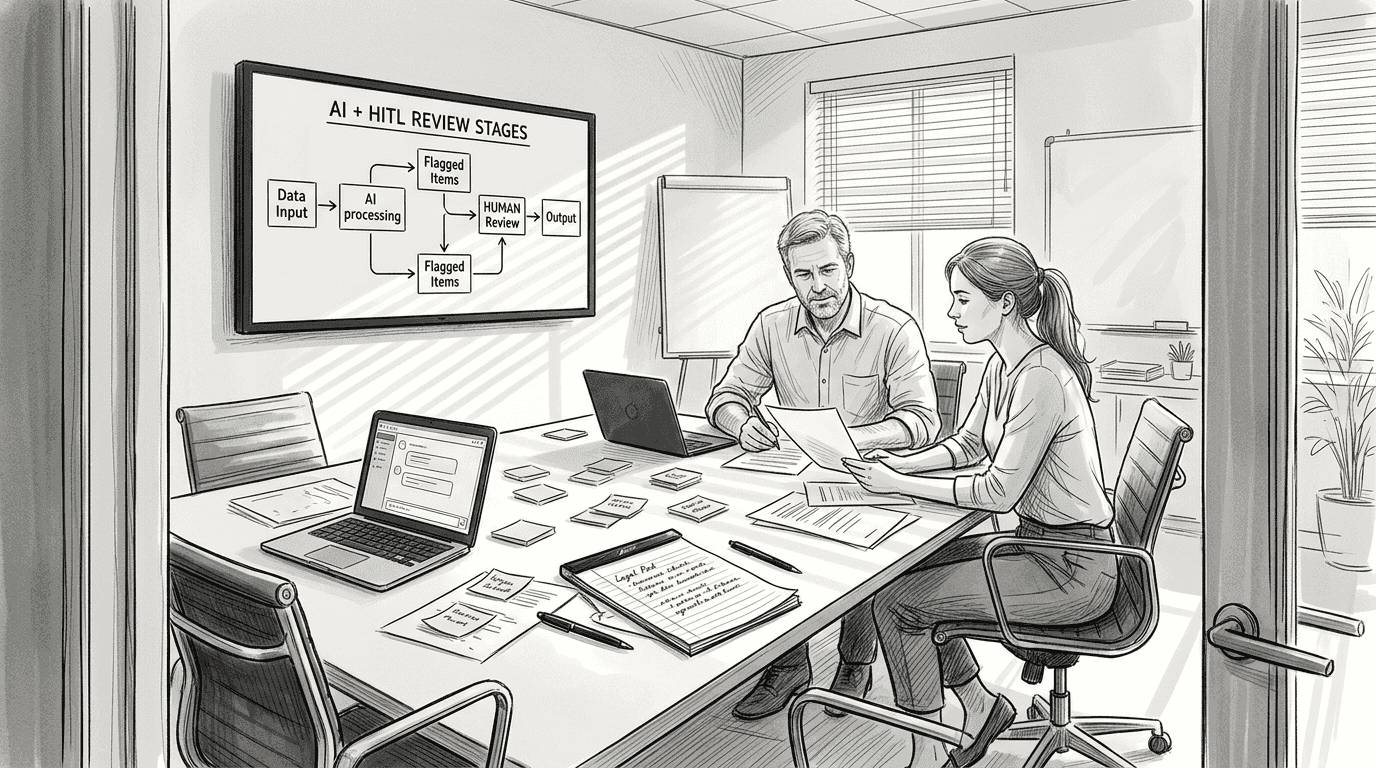
Step 1: Automate initial screening, summarization, and coding using AI tools. AI tools like TAR, predictive coding, and GenAI automate screening, summarization, and coding, drastically reducing manual effort. Upload your document batch and let the AI perform first-pass tasks like extracting key clauses, categorizing document types, or flagging potential issues. This automation handles the bulk of routine work, freeing your team to focus on exceptions and strategic decisions.
Step 2: Set confidence thresholds to identify ambiguous or low-confidence extracts. Configure your AI to flag outputs below 85% confidence for human review. When the system encounters unclear language, contradictory clauses, or unusual formatting, it routes those documents to your review queue instead of processing them automatically. This threshold prevents low-quality outputs from reaching final approval while keeping high-confidence results moving efficiently.
Step 3: Route edge cases to human reviewers for manual validation and correction. Human reviewers examine flagged documents, correct AI errors, and provide feedback that improves future performance. This step catches misinterpretations, validates complex legal language, and ensures critical details receive proper attention. Automation rates reach 80-95% for standard documents while HITL reviews catch 90% of errors with minimal manual checks.
Step 4: Use review gates to verify high-stakes clauses or complex syntheses. Even when AI produces high-confidence outputs, certain document types warrant mandatory human verification. Contracts with liability clauses, financial agreements above specified thresholds, or regulatory filings should pass through review gates where experienced professionals validate AI work. These gates add minimal time while dramatically reducing risk on your most important documents.
Step 5: Iterate prompts and workflows continuously to improve AI accuracy and throughput. Track error patterns, gather reviewer feedback, and update prompts to address recurring issues. If the AI consistently misclassifies a specific clause type, refine your instructions with clearer examples. If certain document formats cause problems, add preprocessing steps or adjust confidence thresholds. Continuous improvement transforms your workflow from good to exceptional over time.
| Workflow Stage | AI Role | Human Role | Typical Timeframe |
|---|---|---|---|
| Initial Screening | Scan all documents, extract metadata | None | Minutes per batch |
| Coding & Categorization | Auto-tag clauses, classify types | Review low-confidence tags | Hours for large batches |
| Edge Case Review | Flag ambiguous content | Validate and correct | 1-2 days for complex docs |
| Final Approval | Summarize findings | Approve high-stakes items | Same day for routine items |
Pro Tip: Create feedback loops where human corrections automatically update your prompt library. When a reviewer fixes an AI error, capture that correction as a training example to prevent similar mistakes in future batches.
Following execution, the guide will address how to verify outcomes and optimize ongoing performance.
Verifying results and optimizing ongoing document review workflows
Delivering accurate results today is only half the battle. You need verification processes and optimization strategies to maintain quality and improve performance over time.
Implement audit trails, version control, and peer reviews for defensibility. Every AI decision should be traceable, showing which model version processed each document, what confidence score it assigned, and who approved the final output. Version control lets you roll back problematic changes and understand how workflow modifications impact accuracy. Peer reviews add another layer of quality control, especially for high-value documents where errors carry significant consequences.
Compare pure human, pure AI, and HITL workflows on accuracy, speed, and scalability. Pure human review delivers high accuracy but struggles with large volumes and tight deadlines. Pure AI processes documents rapidly but makes mistakes on edge cases and complex language. HITL workflows often outperform pure AI or human-only reviews, with 23% faster review speeds reported when combining AI assistance with human oversight. This hybrid approach scales efficiently while maintaining the judgment needed for defensible decisions.
Use productivity metrics to benchmark AI impact and identify improvement areas. Track documents processed per hour, error rates by document type, time saved on routine tasks, and reviewer satisfaction scores. These metrics reveal where AI adds the most value and where human expertise remains essential. Monitor trends over time to ensure your workflow continues improving rather than stagnating.
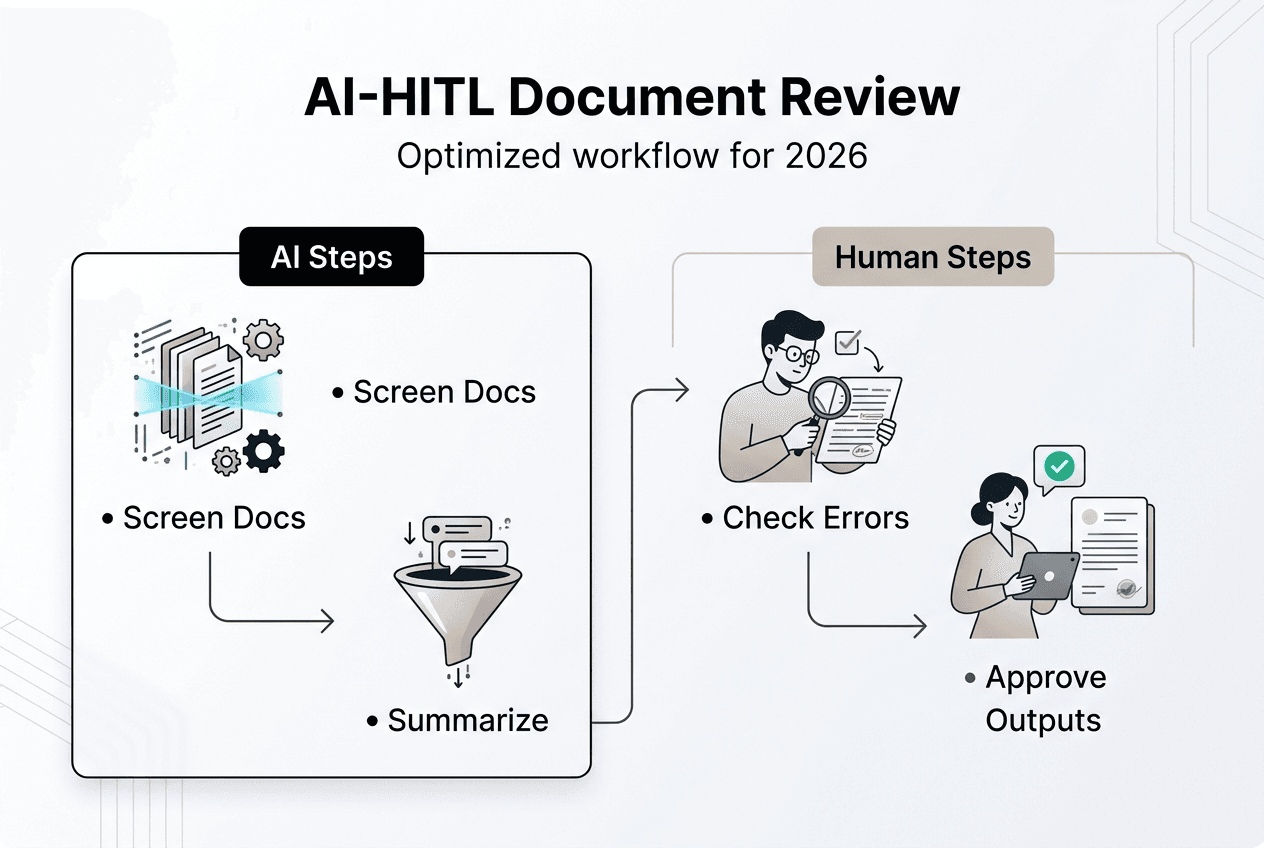
Address pitfalls like AI hallucinations and over-reliance through human checks. AI sometimes generates plausible-sounding but incorrect information, especially when dealing with ambiguous source material. Regular human spot checks catch these hallucinations before they cause problems. Train your team to question AI outputs that seem unusual and verify critical facts against source documents.
Optimize collaboration with centralized repositories, automated alerts, and role-based access. Store all documents and AI outputs in a single platform where team members can see status updates, add comments, and track changes. Automated notifications alert reviewers when documents need attention and managers when batches complete processing. Role-based access ensures sensitive documents reach only authorized personnel while maintaining transparency for audit purposes. Platforms offering real-time AI business benefits can streamline these collaboration features.
- Schedule monthly reviews of error patterns to identify systematic issues requiring prompt updates.
- Create dashboards showing processing volumes, accuracy rates, and time savings to demonstrate ROI.
- Establish escalation paths for documents that fail multiple review attempts.
- Document lessons learned from major errors to prevent recurrence.
Pro Tip: Regularly update AI models and prompts to adapt to evolving document types and regulations. As your business grows and regulations change, your workflows must evolve too. Quarterly reviews of model performance and prompt effectiveness keep your system aligned with current needs.
| Workflow Type | Accuracy Rate | Processing Speed | Scalability | Best Use Case |
|---|---|---|---|---|
| Pure Human | 95-98% | Slow | Limited | High-stakes, complex documents |
| Pure AI | 75-85% | Very Fast | Unlimited | High-volume, routine documents |
| HITL Hybrid | 90-95% | Fast | High | Mixed complexity, production workflows |
After optimizing workflows, we'll briefly summarize options to help you get started with AI-powered solutions.
Simplify your document review with Sofia🤖 AI assistant
Building an effective AI-powered document review workflow requires the right platform to support automation, collaboration, and continuous improvement. Sofia AI integrates advanced automation and HITL workflows for reliable document review, giving you access to over 60 state-of-the-art AI models including GPT-4o, Claude 4.0, and Gemini 2.5 in a single platform.
Boost your team's productivity with intelligent coding, summarization, and review gates that handle routine tasks while routing complex documents to human experts. The secure, centralized platform offers collaboration tools and role-based access controls that meet enterprise security requirements including GDPR compliance and encryption standards. Real-time streaming responses and document analysis for PDFs and images help you process varied document types efficiently. Start optimizing your workflow today with Sofia's easy AI integration and continuous support designed for business professionals and project managers.
Frequently asked questions
What is a document review workflow?
A document review workflow is the sequence of tasks to evaluate, code, and approve documents efficiently. It typically includes intake, classification, extraction of key information, validation, and final approval steps. Effective workflows incorporate collaboration tools, auditability, and continuous improvement to maintain quality while processing high volumes. Using AI can automate routine tasks, but human oversight ensures accuracy with complex documents that require judgment.
How does human-in-the-loop improve document review accuracy?
HITL integrates human review at key points to catch AI errors that automated systems might miss. HITL catches 90% of AI errors with minimal manual reviews, improving accuracy without sacrificing speed. It effectively balances speed with precision for high-stakes documents by letting AI handle routine processing while humans validate ambiguous cases, complex language, and critical clauses. This combination delivers better results than either pure AI or pure human review alone.
What challenges should I expect when implementing AI for document review?
AI can misinterpret ambiguous or scanned documents requiring human review to correct errors and validate outputs. Common challenges include handling scanned or handwritten docs, ambiguous cases, hallucinations, and the need for manual checks. Watch for hallucinations where AI generates inaccurate information that sounds plausible but contradicts source material. Training and prompt iteration are crucial to minimize error rates, especially when dealing with diverse document formats or specialized terminology. Starting with pilot projects helps you identify these issues before full deployment.
How long does it take to implement an AI document review workflow?
Implementation timelines vary based on document complexity, team size, and existing infrastructure. Small teams can launch pilot workflows within two to four weeks by selecting a focused document type, training a core group, and testing with sample batches. Larger organizations with diverse document types and strict compliance requirements may need two to three months for comprehensive rollout including security reviews, integration with existing systems, and organization-wide training. Platforms offering real-time AI business success features can accelerate deployment.
Can AI handle all document types in my review workflow?
AI excels with structured documents like standard contracts, invoices, and compliance forms that follow predictable patterns. It struggles with handwritten notes, heavily redacted files, or documents with complex formatting that obscures text. Scanned documents with poor image quality also pose challenges that may require preprocessing or human review. For best results, categorize your documents by complexity and route simpler types through full automation while reserving human review for edge cases. Challenges with image analysis AI can affect scanned document processing.
How do I measure ROI from AI-powered document review?
Track time saved on routine tasks by comparing hours spent before and after AI implementation. Calculate cost savings from reduced manual labor, faster turnaround times, and fewer errors requiring rework. Measure accuracy improvements by comparing error rates between pure human review and HITL workflows. Monitor team satisfaction and capacity freed up for higher-value work that automation enables. Most organizations see positive ROI within three to six months when AI handles 80% or more of routine document processing while humans focus on complex cases.