
TL;DR:
- AI document analysis offers 95-99% accuracy by understanding structure and context beyond OCR.
- Proper preparation and testing with real documents, including edge cases, are essential for success.
- Continuous monitoring, error handling, and human review improve reliability and workflow fit.
Manual document review drains analyst hours, introduces costly errors, and slows every downstream decision that depends on accurate data. Teams processing invoices, contracts, or scanned archives by hand face a hard ceiling on throughput. Traditional OCR achieves only 80% accuracy and breaks down on real-world variations like skewed scans or handwritten fields. AI-powered document analysis changes that equation by combining layout understanding, contextual reasoning, and continuous learning. This guide walks you through every practical step, from choosing the right tool to troubleshooting silent failures, so your team can move faster and trust the output.
Table of Contents
- Understanding AI-powered document analysis
- Getting started: requirements and preparation
- Step-by-step process: implementing AI document analysis
- Troubleshooting and optimizing results
- Why better AI models aren't always better results
- Take action: streamline analysis with AI
- Frequently asked questions
Key Takeaways
| Point | Details |
|---|---|
| AI trumps OCR | AI-powered tools handle handwritten, scanned, and complex documents more accurately than legacy OCR. |
| Preprocessing is essential | Preprocessing steps like deskewing and noise reduction boost AI accuracy, especially on tricky layouts. |
| Edge cases need HITL | Human-in-the-loop review is necessary for rare formats and to correct silent errors. |
| Pilot first | Test with a small use case before full rollout to identify workflow-specific challenges. |
| Continuous feedback wins | Ongoing review, retraining, and hybrid approaches ensure robust, reliable results over time. |
Understanding AI-powered document analysis
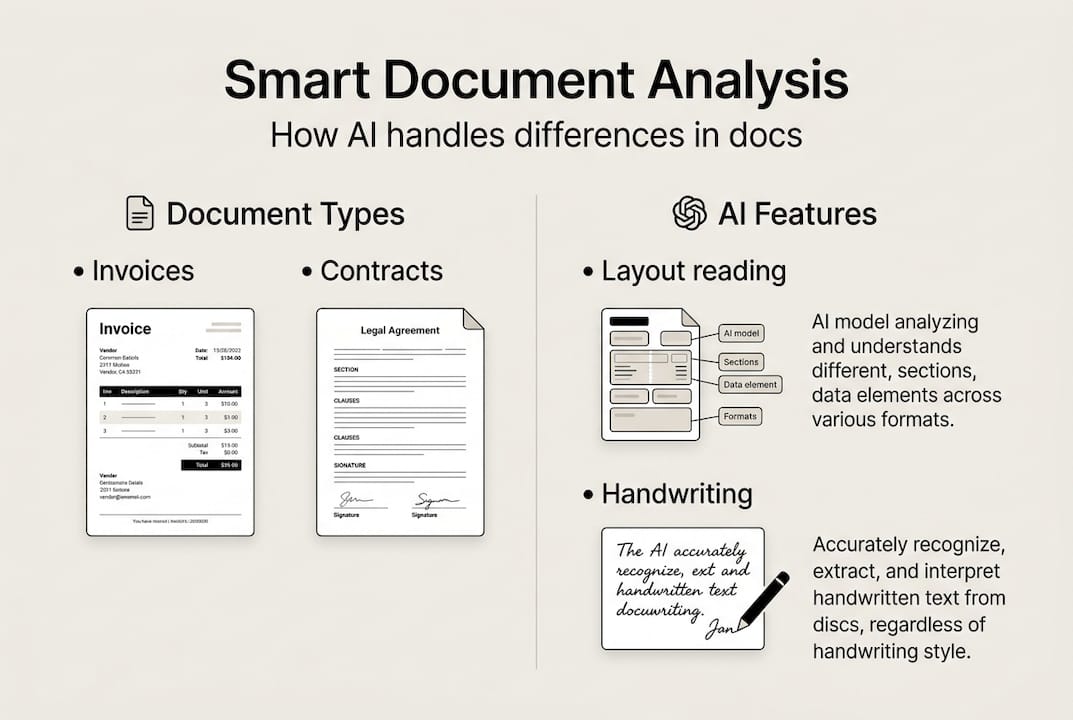
AI-powered document analysis is not simply a faster version of OCR. It uses machine learning models trained on millions of document types to understand structure, context, and meaning, not just raw characters. Where traditional OCR reads pixels in a straight line, AI models recognize that a table cell belongs to a specific column header, that a handwritten signature is a signature and not noise, and that a number in the top-right corner of an invoice is likely a document ID.
Learn more about how AI in document analysis differs from rule-based extraction before you commit to a platform.
Document types AI handles well:
- Scanned paper forms with irregular layouts
- Handwritten notes and signatures
- Multi-column reports and financial tables
- Multilingual contracts and cross-border invoices
- Low-resolution archival images
- PDFs with embedded or layered text
The accuracy gap is significant. AI-powered systems achieve 95 to 99% accuracy on complex layouts, handwriting, and multilingual documents where OCR routinely fails.
| Feature | Traditional OCR | AI document analysis |
|---|---|---|
| Accuracy on clean docs | ~80% | 95-99% |
| Handwriting support | Poor | Strong |
| Layout understanding | None | Advanced |
| Multilingual handling | Limited | Broad |
| Learning from errors | No | Yes |
"The real differentiator is not character recognition but structural understanding. AI models learn that a row in a table has a relationship to its column header, not just a position on a page."
Old approaches fail most often on nonuniform documents: anything with merged cells, rotated text, or inconsistent field placement. AI models handle these because they generalize from patterns rather than following rigid templates. That flexibility is what makes them worth the investment for teams dealing with diverse document sources.
Getting started: requirements and preparation
Before you install anything, audit what you actually need. The most common mistake is selecting a tool based on marketing benchmarks rather than your specific document mix. A system that scores 99% on a public dataset may perform far worse on your internal purchase orders or scanned lease agreements.
Start with a clear checklist:
- Digital copies: Gather a representative sample of 100 to 500 real documents from your workflow
- Data privacy review: Confirm whether documents contain PII (personally identifiable information) and check your compliance obligations
- Workflow goals: Define what success looks like, whether that is extraction speed, field accuracy, or downstream integration
- IT requirements: Identify whether you need cloud, on-premise, or a hybrid setup
When choosing the best AI tool for your workflow, compare deployment models carefully.
| Deployment type | Best for | Trade-offs |
|---|---|---|
| Cloud-based | Fast setup, scalable teams | Data leaves your environment |
| On-premise | Sensitive data, regulated industries | Higher IT overhead |
| Open-source | Custom needs, budget constraints | Requires ML expertise |
Document variability matters more than most teams expect. If your invoices come from 50 different vendors, each with a different layout, you need a model that generalizes well, not one tuned for a single template. Understanding how adapting AI models to your specific context improves results will save you significant rework later.
Experts recommend you start with one doc type and evaluate it against your own workflow before scaling to additional document categories.
Pro Tip: Run a pilot project on a single document type for two to four weeks before expanding. Measure field-level accuracy, not just overall document success rates. A document that is 95% correct but misses a key dollar amount is still a failure for finance teams.
Step-by-step process: implementing AI document analysis
Once your tools and requirements are locked in, implementation follows a repeatable sequence. Skipping steps, especially preprocessing and validation, is where most projects run into trouble.
- Gather your document sample. Collect real documents from production, not synthetic test files. Include edge cases intentionally.
- Enhance image quality. Apply preprocessing to improve model input: deskew rotated pages, reduce background noise, and detect layout zones. Good preprocessing methods dramatically improve downstream accuracy.
- Select your model. Choose a pre-trained model suited to your document category, such as invoice extraction, contract review, or form parsing.
- Fine-tune on your data. Use your labeled sample to adapt the model to your specific layouts and field names.
- Test against held-out documents. Reserve 20% of your sample exclusively for testing. Never evaluate on training data.
- Validate field by field. Check each extracted field type separately. A model may excel at dates but struggle with currency formatting.
- Deploy with monitoring. Push to production with logging enabled so you can track confidence scores and flag low-confidence outputs for review.
Edge cases including rotated scans and handwriting require preprocessing, human-in-the-loop review, and custom fine-tuning to handle reliably. The human-in-the-loop (HITL) approach is not a fallback; it is a designed part of a robust workflow.

Pro Tip: Annotate every document your model gets wrong during testing. Those annotated failures become your most valuable fine-tuning data. Ten well-labeled error cases often improve accuracy more than 1,000 generic training examples.
Troubleshooting and optimizing results
Deployment is not the finish line. AI document analysis systems degrade silently when new document formats enter your pipeline or when upstream scan quality drops. You need a monitoring strategy from day one.
Common errors to watch for:
- Silent failures: The model returns a value but it is wrong, with no confidence warning
- Missing text blocks: Entire sections of a document are skipped, often due to layout detection errors
- Misaligned table data: Cell values are extracted but mapped to the wrong column or row
- Encoding errors: Special characters, currency symbols, or accented letters are corrupted
"Even advanced AI systems produce silent errors on multi-column layouts and low-quality scans. Hybrid approaches and workflow-specific evaluation are necessary to catch what automated metrics miss."
Validation should be workflow-specific. A generic accuracy score tells you little. Instead, build test cases that reflect your actual business rules. For example, if a contract must always contain a termination clause, write a check that flags any output missing that field.
Review AI workflow best practices to structure your quality checks before you go live. For teams handling unstructured text, the AI text analysis guide offers complementary strategies for validating extracted content.
Optimization actions that actually move the needle:
- Retrain the model monthly using newly flagged error cases
- Introduce a confidence threshold below which documents route to human review automatically
- Track error rates by document source, not just document type, to identify problematic vendors or scanners
Pro Tip: Build a feedback loop where reviewers tag corrections directly in your document management system. Those tags feed back into your retraining pipeline without requiring a separate annotation step.
Why better AI models aren't always better results
Here is something the vendor pitch decks rarely tell you: the most accurate model in a benchmark test is often not the best model for your workflow. Public benchmarks are built on curated datasets that look nothing like the documents sitting in your archive.
We have seen teams spend months integrating a state-of-the-art model only to find it underperforms a simpler, well-tuned alternative on their actual documents. The reason is almost always edge cases. A model trained on clean, high-resolution invoices will fail on the faded thermal-paper receipts your field teams submit.
Public benchmarks do not reflect real-world workflow results, and edge case handling is often the biggest factor in production performance. The teams that get the best results are not chasing the highest accuracy number. They invest in error handling, feedback loops, and case-by-case evaluation against their own document mix.
The uncomfortable truth is that workflow fit beats raw capability every time. A model that scores 97% on a benchmark but produces silent errors on your most common document type is worse than a model that scores 93% but fails loudly and predictably. Loud, predictable failures are fixable. Silent ones erode trust in your entire data pipeline before anyone notices.
Invest your time in building evaluation sets from your own documents, not in reading benchmark leaderboards.
Take action: streamline analysis with AI
AI document analysis delivers real speed and reliability gains, but only when you implement it thoughtfully, starting with the right document sample, evaluating against your actual workflow, and building in human review for the cases that matter most.
The Sofia AI assistant gives business and analytics teams direct access to over 60 leading AI models, including GPT-4o, Claude 4.0, and Gemini 2.5, with built-in document analysis for PDFs and images, enterprise encryption, and GDPR compliance. You can start analyzing documents immediately without complex infrastructure setup. Whether you are processing contracts, financial reports, or scanned archives, Sofia brings the full workflow, from extraction to collaboration, into one secure platform.
Frequently asked questions
What kinds of documents benefit most from AI analysis?
AI analysis excels with invoices, contracts, forms, scanned archives, and documents containing handwriting or complex layouts. Systems that handle diverse formats including multi-column layouts and low-quality scans deliver the broadest value.
How does AI-powered document analysis improve accuracy over OCR?
AI-powered analysis understands layout, context, and handwriting, achieving up to 99% accuracy where OCR typically caps at 80% on complex documents.
What are edge cases in document analysis and why do they matter?
Edge cases include unusual layouts, merged tables, low-quality scans, and handwriting. These cause processing failures that undermine data quality if not addressed through preprocessing and human review.
How do I handle errors or silent failures in AI document analysis?
Combine AI with human review for critical data fields and regularly audit outputs by document source. Workflow-specific auditing and human-in-the-loop checks catch the silent failures automated metrics miss.