
TL;DR:
- AI reduces analysis time by automating data cleaning, exploration, and feature engineering tasks.
- Human oversight remains essential as AI struggles with causality, reasoning, and complex data retrieval.
- Proper integration, bias monitoring, and starting with high-ROI pilots maximize AI's benefits in data analysis.
AI-driven tools can cut analysis time by up to 70%, and that number alone is enough to make any data team pay attention. But here's the misconception worth addressing right away: AI is not a plug-and-play replacement for skilled analysts. It's a force multiplier. The teams seeing the biggest gains aren't the ones who handed everything to an algorithm. They're the ones who figured out exactly where AI fits into their workflow and where human judgment is still irreplaceable. This guide walks you through how AI reshapes data analysis, what the benchmarks actually show, and how to integrate it without falling into common traps.
Table of Contents
- The AI-driven transformation of data analysis workflows
- AI-powered analytics: predictive, prescriptive, and real-time capabilities
- Benchmarks, accuracy, and limitations of AI in data analysis
- Practical guidance: integrating AI for business data analysis
- Our take: why AI is a powerful partner but not a replacement
- Explore AI solutions for data analysis success
- Frequently asked questions
Key Takeaways
| Point | Details |
|---|---|
| Data-centric AI | Focusing on data quality enables better outcomes from AI-powered analysis. |
| Augmentation not replacement | AI significantly boosts analyst productivity but cannot fully replace human expertise. |
| Advanced analytics | AI tools power predictive, prescriptive, and real-time insights that drive business decisions. |
| Know the limitations | Benchmarks highlight gaps in AI pipeline accuracy and reasoning, requiring human oversight. |
| Practical adoption | Successful integration starts with pilot projects, data quality, and bias monitoring for optimal results. |
The AI-driven transformation of data analysis workflows
Traditional data analysis workflows are slow by design. Analysts spend hours cleaning messy datasets, hunting down outliers, and building features before they ever get to the interesting part. AI changes that equation dramatically.
Modern AI automates data processing, cleaning, exploratory data analysis (EDA), feature engineering, labeling, and augmentation across the entire analysis pipeline. What used to take days can now take hours. That's not an exaggeration. It's the practical reality for teams already using these tools.
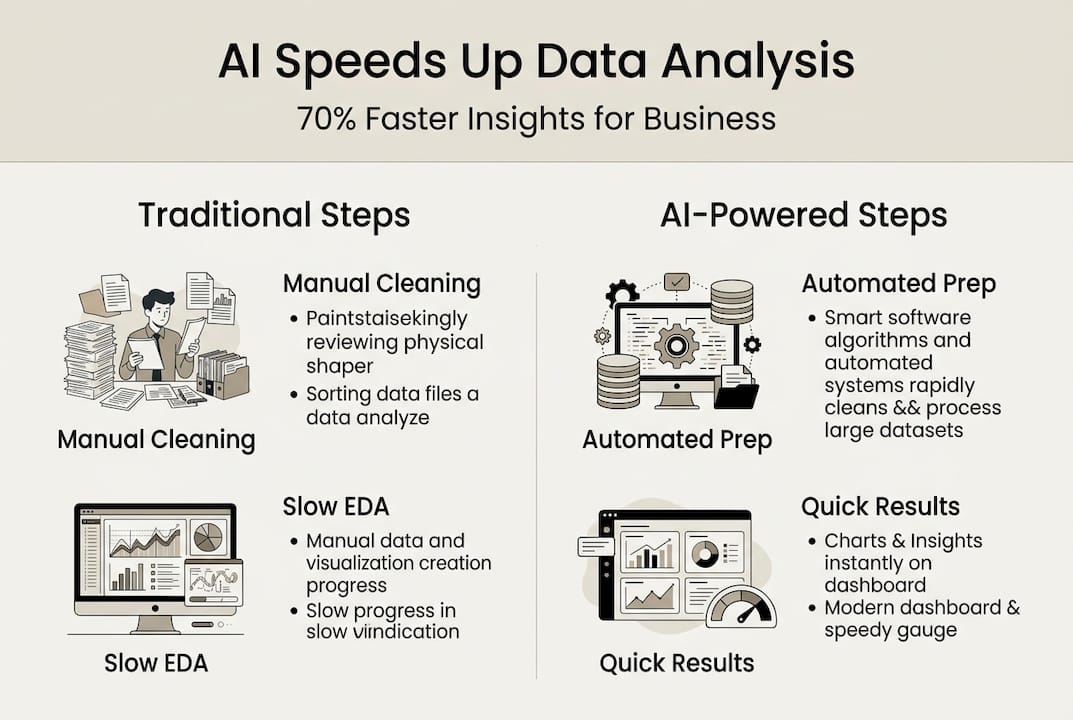
The biggest shift in thinking comes from what Gartner calls the data-centric AI approach: instead of obsessing over which model to use, you prioritize data quality first. Better data consistently produces better outcomes, regardless of the model. This reframes how analysts should spend their time.
Here's a quick look at how AI impacts each stage of a typical workflow:
| Workflow stage | Traditional time cost | AI-assisted time cost |
|---|---|---|
| Data cleaning | High | Low |
| EDA | Medium | Low |
| Feature engineering | High | Medium |
| Model building | Medium | Low |
| Reporting | Medium | Low |
The stages where AI delivers the most relief are exactly the ones analysts find most tedious. That's not a coincidence. AI excels at pattern-based, repetitive tasks, which is precisely what data prep involves.
Key areas where AI reshapes analyst workflows:
- Automated anomaly flagging during data ingestion
- Smart imputation for missing values based on statistical context
- Natural language querying so non-technical stakeholders can explore data directly
- Auto-generated EDA reports that surface correlations and distributions instantly
For a deeper look at which platforms deliver on these promises, the top AI tools for data analysis guide covers the leading options by use case. If your team handles large document sets alongside structured data, AI in document analysis is also worth exploring.
Pro Tip: Don't automate everything at once. Start by automating your most time-consuming, lowest-judgment task first. That's usually data cleaning. Master one stage before expanding.
The AI-driven data analysis landscape is evolving fast, but the fundamentals remain the same: garbage in, garbage out. AI makes the pipeline faster, but it doesn't fix bad data strategy.
AI-powered analytics: predictive, prescriptive, and real-time capabilities
Once your data pipeline is cleaner and faster, AI opens the door to analytics capabilities that simply weren't practical before.
Machine learning algorithms, natural language processing (NLP), and deep learning now power three distinct analytics tiers that matter for business professionals:
- Predictive analytics: Forecasting future outcomes based on historical patterns. Think demand forecasting, churn prediction, or revenue modeling.
- Prescriptive analytics: Going beyond prediction to recommend specific actions. AI evaluates multiple scenarios and surfaces the option most likely to achieve your goal.
- Real-time analytics: Processing and analyzing data streams as they arrive, enabling instant decisions in fraud detection, supply chain monitoring, and customer behavior tracking.
AI enables predictive and prescriptive analytics, anomaly detection, and real-time processing through ML algorithms, NLP, and deep learning working in combination. These aren't separate tools. They're layered capabilities that build on each other.

The most exciting development right now is agentic AI, where context-aware systems handle multi-step analysis tasks with minimal human prompting. Predictive maintenance applications using agentic AI have reduced analysis time by 70% in industrial settings. That's a benchmark worth taking seriously.
| Analytics type | AI capability | Business example |
|---|---|---|
| Predictive | Pattern recognition | Sales forecasting |
| Prescriptive | Scenario optimization | Pricing strategy |
| Real-time | Stream processing | Fraud detection |
| Anomaly detection | Statistical deviation | Quality control |
For organizations exploring real-time AI for business, the use cases extend well beyond tech companies. Retailers, logistics firms, and financial institutions are all seeing measurable ROI from real-time analytics pipelines.
Reviewing best AI practices in data analytics before scaling any of these capabilities will save your team significant rework down the road.
Benchmarks, accuracy, and limitations of AI in data analysis
Here's where things get more nuanced. The marketing around AI tools often emphasizes peak performance in controlled demos. Real-world deployments tell a more complicated story.
"AI and large language models achieve high accuracy in isolated tasks but consistently struggle when placed inside end-to-end analytical pipelines."
Multi-agent AI benchmarks confirm this pattern across multiple evaluation frameworks. A model that performs brilliantly on a single question-answering task can degrade significantly when chained into a longer workflow with multiple dependencies.
Specific failure modes you need to plan for:
- Data lake retrieval failures: AI struggles to navigate complex, unstructured data lakes without precise indexing and metadata management
- Fine-grained reasoning gaps: Tasks requiring multi-step logical deduction still trip up even the best models
- Hallucination risk: AI failures in reasoning tasks increase with more complex reasoning models, not less. Counterintuitively, more capable models sometimes produce more confident but wrong answers
- Financial data sensitivity: General analytics models often underperform on domain-specific financial retrieval tasks
Understanding AI model types helps you match the right model to the right task, which is the most practical way to manage these limitations.
Human oversight isn't optional. It's the reliability layer that makes AI-assisted analysis trustworthy. Analysts who treat AI outputs as drafts rather than final answers catch errors before they reach stakeholders. That mindset shift is what separates high-performing AI-integrated teams from ones that eventually lose trust in their own tools.
Data privacy in AI is another dimension that benchmarks rarely capture. Accuracy means nothing if your analysis pipeline creates compliance exposure.
Practical guidance: integrating AI for business data analysis
Knowing AI's strengths and limitations is useful. Knowing exactly how to act on that knowledge is better. Here's a practical integration framework.
Step-by-step approach to AI integration:
- Identify your highest-ROI pilot: Choose one workflow where time savings are measurable and the stakes for errors are manageable. Data cleaning or automated reporting are good starting points.
- Audit your data quality first: AI amplifies whatever quality level your data already has. Fix the fundamentals before automating.
- Introduce NLP for non-technical access: Natural language querying tools let business stakeholders explore data without writing SQL, which reduces bottlenecks and increases adoption.
- Build a human review checkpoint: Every AI-generated insight should pass through a domain expert before influencing decisions.
- Monitor for bias continuously: AI augments analyst productivity by up to 80% in time savings, but bias embedded in training data will surface in outputs if you're not watching for it.
Common pitfalls to avoid:
- Over-relying on AI for causal analysis (it detects correlation, not causation)
- Skipping documentation of AI-assisted decisions
- Deploying AI tools without a clear data governance policy
- Assuming one model fits all use cases across your organization
For teams scaling beyond a single pilot, the AI for business productivity guide covers collaboration structures and governance frameworks in detail. If your analysis involves large text datasets, AI text analysis tools can process unstructured content at a scale no human team could match.
Pro Tip: Track your time savings from day one. Concrete numbers make it easier to justify expanding AI adoption and help you spot when a tool stops delivering value.
Following AI integration best practices from teams already running mature pipelines cuts your learning curve significantly.
Our take: why AI is a powerful partner but not a replacement
We've watched organizations chase full automation in their data teams, and it rarely ends well. The ones that succeed treat AI as a very fast, very tireless junior analyst, one that needs direction, review, and correction.
AI genuinely excels at pattern detection and automation but lacks causality, common sense, and the ability to understand business context. It can tell you that two variables move together. It cannot tell you why, or whether acting on that relationship makes strategic sense.
The analysts who will thrive are the ones who use AI to eliminate the tedious work and then apply their judgment to the output. That's not a threat to the profession. It's an upgrade. The skill that becomes more valuable is knowing which AI output to trust, which to question, and which to throw out entirely.
Future-proofing your data team means investing in business productivity and collaboration skills alongside technical AI literacy. Both matter equally.
Explore AI solutions for data analysis success
If you're ready to move from theory to practice, the right platform makes a significant difference. Sofia🤖 gives data analysts and business teams access to over 60 state-of-the-art AI models, including GPT-4o, Claude 4.0, and Gemini 2.5, all in one place.
Whether you need document analysis, real-time streaming responses, or team collaboration tools, Sofia🤖 is built for exactly the kind of multi-model, multi-use-case work that modern data analysis demands. Start with the AI-powered personal assistant to explore what's possible, or browse the best AI tools for workflow guide to find the right fit for your specific analysis needs. Your next insight is closer than you think.
Frequently asked questions
How does AI help with data cleaning and preparation?
AI automates cleaning, EDA, and feature engineering tasks that traditionally consume the majority of an analyst's time, freeing them to focus on interpretation and decision-making instead.
Can AI fully replace human data analysts?
No. AI augments analysts but cannot replace them because it lacks contextual understanding, causal reasoning, and the ability to catch its own blind spots without human review.
What should businesses watch for when adopting AI in data analysis?
Prioritize high-ROI pilots and bias monitoring from the start, and always build a human review step into any AI-assisted decision workflow to catch hallucinations and data quality issues early.
How accurate is AI in complex data analysis tasks?
AI achieves strong accuracy in isolated tasks but performance drops in end-to-end pipelines, especially where multi-step reasoning, domain-specific knowledge, or unstructured data retrieval is involved.