
Most content creators hit the same wall: too many topics to cover, too little time, and a constant pressure to publish work that actually performs. The volume demands alone are enough to burn out even the most dedicated teams. But here's what separates creators who scale from those who stall: a repeatable, human-led workflow that uses AI as a force multiplier. AI content creation workflows typically follow 5 to 7 core stages, from strategic planning and research all the way through measurement and iteration. This guide walks you through every stage, with practical tips, real benchmarks, and the pitfalls you need to avoid.
Table of Contents
- What you need to start: tools and prerequisites
- Step 1: Strategic planning and research
- Step 2: Setting up brand voice and AI prompts
- Step 3: Outline and draft generation
- Step 4: Human review and editing
- Step 5: Optimization, publishing, and measuring results
- Take your content workflow further with Sofia🤖
- Frequently asked questions
Key Takeaways
| Point | Details |
|---|---|
| AI boosts output | You can produce 3-5x more content and save up to 75% on time and cost with hybrid AI workflows. |
| Human review required | Always review and edit AI drafts to match quality, style, and factual accuracy. |
| Start small to scale | Validate with 10 pieces using one template before scaling up your workflow. |
| Optimize for AI search | Use data tables and question-based headers to improve your content’s discoverability. |
| Hybrid beats AI-only | AI plus human workflows outperform pure AI or unedited drafts for long-term quality and results. |
What you need to start: tools and prerequisites
Before launching into the process, make sure you have the key tools and plans in place. Getting set up correctly from the start saves you hours of rework later.
Essential tools for your AI content stack:
- AI writing assistants such as GPT-4o, Claude 4.0, or Perplexity for drafting and ideation
- Research databases and fact-checking sources to verify AI outputs
- A prompt template library that encodes your brand rules and tone
- A brand or style guide your whole team can reference
- Cloud-based document tools for versioning and collaboration
Skills you need before you scale:
- Basic prompt engineering (knowing how to instruct AI clearly)
- Strong editing ability to catch errors and generic phrasing
- A clear picture of your target audience and what they actually need
The numbers make a compelling case for building this stack. AI-powered workflows boost output by 4 to 5x with 50 to 75% time savings, and article costs drop to $30 to $60 compared to $200 to $800 for fully human-written pieces. That kind of efficiency gain is why so many teams are investing in AI for productivity right now.
| Approach | Cost per article | Time per piece | Output volume |
|---|---|---|---|
| Human only | $200 to $800 | 4 to 8 hours | Low |
| AI only | $10 to $20 | 30 to 60 min | Very high |
| AI + human hybrid | $30 to $60 | 1 to 2 hours | High |
Pro Tip: Start with a single AI prompt template, publish 10 pieces using it, and measure results before building out a larger library. Scaling a broken template just creates more broken content.
Step 1: Strategic planning and research
With your tools ready, it's time to lay the strategic groundwork for high-performing content. Skipping this step is the fastest way to produce content nobody reads.
- Define your ideal customer profile (ICP). Know exactly who you're writing for, what problems they face, and what outcomes they want from your content.
- Set content goals before you write a single word. Are you driving traffic, building authority, or converting leads? Each goal shapes your topic selection and format.
- Use AI for rapid topic ideation. Tools like Perplexity or GPT-4o can surface dozens of angles in minutes. Filter them through your own judgment and audience knowledge.
- Verify every fact and data point. AI tools hallucinate. Cross-check statistics against primary sources before they make it into your draft.
- Build a research checklist. Confirm that your angle is unique, that you have credible sources, and that the topic aligns with your content calendar.
The 5 to 7 stage workflow used by top content teams always starts here, with strategy, not with writing. Jumping straight to drafting without a clear plan is one of the most common and costly mistakes creators make. A solid content strategy with AI gives every piece a purpose before it's written.
Pro Tip: Document all your research sources and topic ideas in a shared workspace like Notion or Google Docs. When you return to a topic weeks later, you'll thank yourself for the organized notes.
Step 2: Setting up brand voice and AI prompts
Now that you know what to create, ensure your content is consistent by setting up your brand's unique voice. Without this step, AI will default to a generic, forgettable tone.
What to include in your brand voice setup:
- A written style guide covering tone, vocabulary preferences, and formatting rules
- Core prompt templates that encode your voice directly into every AI instruction
- Examples of your best-performing content for the AI to reference
- A list of words, phrases, and structures to avoid
- Clear rules on how to handle technical terms, humor, and calls to action
Iterate your prompts based on actual outputs. If the AI keeps producing content that sounds stiff or off-brand, adjust the prompt before you adjust the draft. You can explore brand voice templates and AI text analysis tools to speed up this calibration process.
"Human-in-the-loop is essential: 97% of teams edit AI content, and hybrid AI plus human workflows rank and perform equal to or better than pure AI approaches."
This stat should reframe how you think about AI. It's not a replacement for human judgment. It's a drafting engine that needs a skilled editor at the wheel.
Step 3: Outline and draft generation
With your voice defined, move on to generating powerful outlines and drafts using your chosen tools. This is where speed gains become real.
- Start with an outline, not a draft. Feed your AI tool the topic, target audience, and key questions to answer. Ask it to produce a structured outline first.
- Review and adjust the outline yourself. Add sections the AI missed, remove redundant angles, and make sure the flow matches your reader's journey.
- Generate the draft section by section. Prompting for the full article at once often produces generic output. Break it into chunks for better control.
- Spot-check for AI-isms immediately. Look for repetitive phrasing, vague transitions, and overused words like "comprehensive" or "delve."
To avoid AI-isms and ensure E-E-A-T, structure your content with clear headers, specific data points, and first-person insights where relevant. AI search engines reward content that answers real questions with real evidence.

| Drafting method | Speed | Cost | Traffic impact |
|---|---|---|---|
| AI only | Very fast | Very low | Moderate, higher bounce |
| Human only | Slow | High | Strong, lower bounce |
| AI + human hybrid | Fast | Low to medium | Strong, lower bounce |
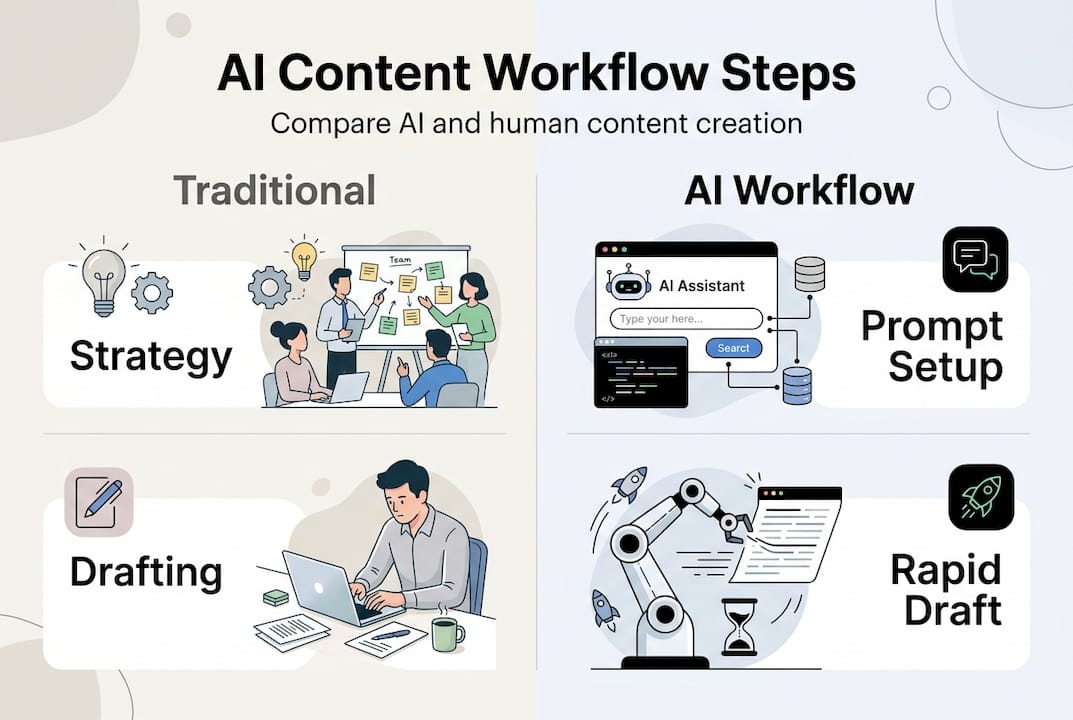
Pro Tip: Build a reusable outline template for your most common content formats, like how-to guides, listicles, or case studies. Paste it into your prompt each time and you'll cut outline creation time by more than half.
For a deeper walkthrough, the step-by-step AI drafting guide covers advanced prompting techniques worth bookmarking.
Step 4: Human review and editing
After drafting, the real magic happens in the editing and human review stage. This is where good content becomes great content.
- Read the full draft out loud. Your ear catches awkward phrasing that your eye skips over.
- Check every factual claim. AI tools can confidently state incorrect statistics. Verify each one against a primary source.
- Scan for AI-isms. Replace vague, repetitive, or overly formal language with specific, direct sentences.
- Add your own insights and examples. This is what builds E-E-A-T (Experience, Expertise, Authoritativeness, Trustworthiness) and makes your content stand out.
- Confirm brand voice alignment. Read it as your target reader would. Does it sound like you, or does it sound like a machine?
"Pure AI content produces 78% more traffic but also a 31% higher bounce rate, which is exactly why editing is non-negotiable."
That bounce rate gap is the cost of skipping human review. Readers can tell when content is hollow, and they leave fast. Strong AI editing best practices close that gap and protect your performance metrics.
Step 5: Optimization, publishing, and measuring results
Once content is polished, it's time to share and track its real-world impact. Publishing without a measurement plan means you're flying blind.
Before you hit publish, check these boxes:
- Structured headers that answer specific reader questions
- Data tables where comparisons or benchmarks are relevant
- Internal links to related content for depth and navigation
- Meta title and description optimized for your target keyword
- Schema markup if your CMS supports it
For AI search optimization, structured data and question-based headers are no longer optional. AI-powered search engines surface content that directly answers queries, and formatting is a major ranking signal.
Key metrics to track after publishing:
- Organic traffic and keyword rankings (check at 30, 60, and 90 days)
- Engagement rate and average time on page
- Bounce rate (a high bounce rate signals a content quality or relevance issue)
- Conversion rate if the piece has a specific goal
- Social shares and backlinks as authority signals
The results speak for themselves. 87% of marketers now use AI in their content workflows, and teams running an 80/20 AI to human mix report 3 to 5x output gains and 40 to 60% traffic growth within 90 to 180 days. That's not a marginal improvement. That's a structural advantage. Use AI SEO optimization tools to continuously refine published pieces based on real performance data.
Take your content workflow further with Sofia🤖
Building a repeatable AI content workflow is one of the highest-leverage moves you can make as a creator or content team. But the quality of your output depends heavily on the quality of your AI tools.
Sofia🤖 gives you access to over 60 state-of-the-art AI models, including GPT-4o, Claude 4.0, and Gemini 2.5, all in one platform. You can switch between models mid-workflow, collaborate with your team in real time, and analyze documents or research PDFs without leaving the interface. Whether you're a solo creator testing your first AI template or a content team scaling to hundreds of pieces per month, Sofia🤖 is built to match your pace and protect your data with enterprise-grade security. Start your workflow with the right foundation.
Frequently asked questions
What is the most important step in content creation with AI?
Human editing and review is the most critical step. 97% of teams edit AI content before publishing, because unedited AI output consistently underperforms on quality, brand fit, and originality.
How much faster is AI-powered content creation compared to traditional workflows?
AI-powered workflows typically cut production time by 50 to 75% and can boost output by 4 to 5x compared to fully human-written processes.
What are common mistakes when using AI for content creation?
The biggest mistakes are skipping human editing, ignoring brand voice setup, and publishing content full of AI-isms and generic phrasing that readers and search engines both penalize.
Can small teams or solo creators use these AI workflows effectively?
Absolutely. The lean approach works well for solo creators: start with one template, validate it across 10 pieces, then scale what's working.
How do I optimize AI content for search engines?
Structure your articles with question-based headers and data tables to match how AI-powered search engines surface and rank content.