
TL;DR:
- AI document processing automates data capture and classification for all document types across industries.
- Proper preprocessing, human oversight, and testing on real data are key for successful implementation.
- It offers significant cost savings, faster processing, and improved accuracy compared to manual workflows.
Most organizations assume AI document processing belongs to tech giants and financial institutions with massive IT budgets. That assumption is costing them time, money, and competitive ground. Manual document workflows drain productivity across every industry, from healthcare to logistics to legal services. AI document processing automates data capture and handling for all document types, making it accessible to businesses of every size. This article covers the essentials, the technology behind it, the real business benefits, and the honest challenges you need to understand before choosing a solution.
Table of Contents
- What is AI document processing?
- How does AI document processing work?
- Benefits for business productivity and workflow
- Nuances, challenges, and expert strategies
- AI document processing: What most businesses overlook
- Next steps: Power your workflow with AI document processing
- Frequently asked questions
Key Takeaways
| Point | Details |
|---|---|
| AI processes all documents | AI document processing automates data handling for structured, semi-structured, and unstructured files. |
| Delivers major cost savings | Tiered AI solutions can reduce document handling costs by as much as 70%. |
| Human oversight is vital | Even advanced systems need human-in-the-loop checks to ensure accuracy and reliability. |
| Success needs real-world testing | Evaluating solutions with your toughest documents leads to stronger outcomes than relying on demos alone. |
What is AI document processing?
AI document processing, also called Intelligent Document Processing (IDP), is a technology that uses artificial intelligence to automatically read, sort, extract, and manage data from business documents. It goes far beyond simple scanning. IDP handles three distinct document categories that most organizations deal with every day.
Structured documents follow a fixed format, like standardized tax forms or registration sheets. Semi-structured documents have predictable elements but variable layouts, like invoices from different vendors. Unstructured documents have no consistent format at all, like emails, contracts, or customer letters.
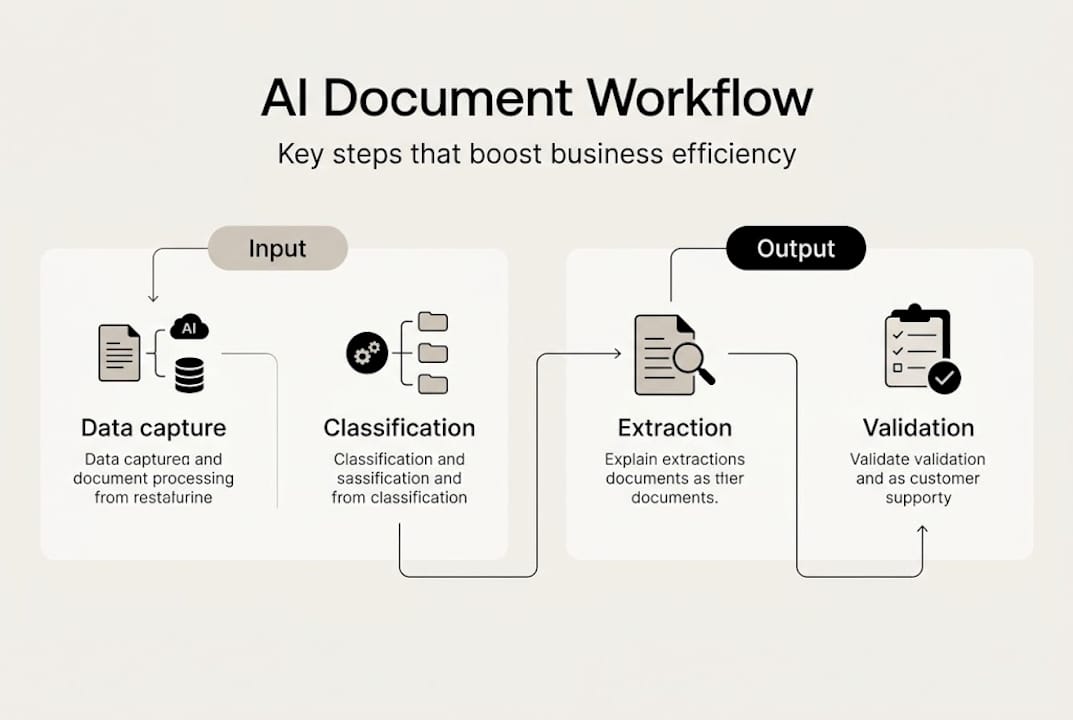
The document analysis steps in a typical IDP pipeline include data capture, classification, extraction, validation, and integration into downstream business systems. Each step builds on the previous one, creating a continuous automated flow that replaces hours of manual handling.
Understanding AI text analysis basics helps clarify why this matters: AI systems can recognize patterns in language and layout that would take a human analyst significant time to process manually.
Main capabilities of AI document processing:
- Automated data extraction from any document format
- Intelligent document classification by type and content
- Validation against business rules and external data sources
- Seamless integration with ERP, CRM, and accounting systems
- Continuous learning to improve accuracy over time
Here is a quick look at how different document types map to processing outcomes:
| Document type | Processing outcome |
|---|---|
| Supplier invoice | Capture line items, totals, vendor details |
| PDF contract | Extract key clauses, dates, party names |
| HR onboarding form | Pull employee data into HR systems |
| Customer email | Classify intent, route to correct team |
| Shipping manifest | Extract item counts, destinations, carriers |
AI document processing automates capture, classification, extraction, validation, and integration across a wide variety of business documents, which is why adoption is accelerating across industries that once relied entirely on manual data entry.
How does AI document processing work?
Now that we understand what AI document processing is, let's break down how these systems actually work for your business.
The process is a structured pipeline, not a single magic step. Each stage has a specific job, and the quality of each stage directly affects the final output.
- Import: Documents arrive via email, upload, scanner, or API connection.
- OCR (Optical Character Recognition): The system converts images or scanned pages into machine-readable text.
- Classification: AI identifies what type of document it is based on layout, keywords, and structure.
- Extraction: Natural language processing (NLP) and machine learning (ML) models pull specific data fields like invoice numbers, dates, and amounts.
- Validation: Extracted data is checked against business rules, databases, or prior records to catch errors.
- Integration: Clean, validated data flows directly into your ERP, accounting platform, or workflow system.
Large language models (LLMs) have dramatically improved the extraction and classification steps. However, LLMs need proper preprocessing such as OCR, and context engineering with structured flows is critical for reliable outcomes. In other words, the AI is only as good as the quality of text it receives.
Consider a practical example. A mid-sized manufacturing company receives 800 supplier invoices per month from vendors across five countries. Each invoice has a different layout, currency, and language. With AI document processing, each invoice is scanned, classified, and extracted automatically. The data lands in the accounting system within minutes, not days.

Pro Tip: Investing in robust preprocessing, like high-quality OCR and document cleaning, delivers better AI results than simply upgrading to the latest model. Clean input creates accurate output.
This is also where boosting efficiency with AI becomes tangible. When the pipeline is well-designed, the entire process runs with minimal human intervention, freeing your team for higher-value work. Teams exploring AI tools for business consistently find that workflow automation in document handling is one of the fastest wins available.
Benefits for business productivity and workflow
Understanding the technology is one side of the story. The bigger question for decision-makers is how much value these solutions deliver in real business settings.
The numbers are compelling. Tiered processing architectures optimize costs and can save businesses 60 to 70% on processing expenses compared to manual or basic automated approaches. That figure alone justifies a serious evaluation for most finance and operations teams.
Beyond cost, the accuracy gains matter just as much. Manual data entry carries an error rate that compounds across large document volumes. AI validation layers catch mismatches, flag anomalies, and route exceptions for human review before errors reach your systems.
Key benefits of AI document processing for business teams:
- Faster turnaround on invoices, contracts, and compliance documents
- Higher data accuracy through automated validation
- Significant cost reduction in labor-intensive document workflows
- Compliance support through consistent audit trails and data retention
- Scalability to handle volume spikes without adding headcount
Pro Tip: When evaluating vendors, prioritize solutions that offer tiered processing, where simpler documents are handled cheaply and automatically, while complex ones receive more intensive processing. This balance drives both cost efficiency and reliability.
A real-world example makes this concrete. A multinational finance team processing cross-border invoices reduced their invoice cycle from three weeks to two days after implementing AI document processing. Their team shifted from manual data entry to exception review, handling only the cases the AI flagged as uncertain.
For teams focused on faster business insights, the speed improvement alone changes how quickly decisions get made. Combining this with productivity best practices creates compounding efficiency gains across the organization.
Nuances, challenges, and expert strategies
While the benefits are impressive, deploying AI document processing comes with intricacies and challenges organizations must consider.
One of the most underappreciated issues is the validation paradox. As AI accuracy improves, teams reduce human oversight. But the errors that do slip through become harder to catch and more consequential. A system that is 99.5% accurate on 10,000 documents still produces 50 errors, and those errors now receive less scrutiny than before.
"Production success depends on context engineering rather than model size. Evaluate vendors on their weakest results, not demos."
This insight reshapes how you should evaluate any IDP vendor. Ask to see performance on your actual documents, including your messiest, most inconsistent ones. Polished demo documents do not reflect real business conditions.
Here is how the three main approaches compare:
| Approach | Speed | Accuracy | Cost | Scalability |
|---|---|---|---|---|
| Manual processing | Slow | Variable | High | Low |
| Basic automation (rules-based) | Medium | Moderate | Medium | Limited |
| Advanced AI-powered IDP | Fast | High | Lower at scale | High |
Building robust document review workflows requires more than picking the right model. Follow these steps to architect for reliability:
- Invest in preprocessing quality before selecting your AI model.
- Test edge cases with your own document samples, not vendor-provided ones.
- Design human-in-the-loop (HITL) checkpoints for low-confidence extractions.
- Monitor accuracy continuously and retrain on failure cases.
- Integrate oversight into your workflow so exceptions are reviewed, not ignored.
Context engineering, the practice of structuring how AI receives and processes document inputs, is the real differentiator between systems that work in demos and systems that work in production. Organizations that skip this step often find their AI solution underperforms after the initial rollout excitement fades.
AI document processing: What most businesses overlook
With the technology and typical challenges explored, it is worth sharing what many leaders miss when implementing AI document processing.
The biggest mistake is trusting a vendor's demo without testing your own edge cases. Every vendor shows their system handling clean, well-formatted documents. The real question is how their solution performs on your most complex, inconsistent, and error-prone files.
Organizational success stalls not because the AI is weak, but because the process design is poor. Teams rush to automate without mapping their actual document flows, exception rates, and downstream dependencies. The result is a system that works beautifully on 80% of documents and creates chaos on the remaining 20%.
Evaluate vendors on real, messy business data, not staged documents. This single practice separates successful implementations from expensive disappointments.
Pro Tip: Always pilot solutions with your most complex, error-prone documents first. If the system handles those well, it will handle everything else with ease.
Exploring an AI model productivity guide can also help your team understand which underlying models suit your document types and volume requirements before you commit to a platform.
Next steps: Power your workflow with AI document processing
The right AI document processing strategy can unlock dramatic efficiency gains across your organization. Whether you are managing hundreds of invoices or thousands of contracts, the difference between manual workflows and intelligent automation is measurable in both time and dollars.
SofiaBot AI solutions give your team access to over 60 advanced AI models, including document analysis capabilities for PDFs and images, all within a secure, GDPR-compliant platform. You can explore how AI improves document analysis through practical guides that show real-world implementation approaches. Start with a pilot on your most challenging document types and build from there.
Frequently asked questions
How is AI document processing different from OCR?
AI document processing uses OCR as a first step, but then adds classification, data extraction, validation, and system integration to automate full document workflows. AI document processing automates capture, classification, extraction, validation, and integration of data, making it far more capable than OCR alone.
What types of documents can AI process automatically?
AI document processing handles structured, semi-structured, and unstructured documents. AI captures data from structured, semi-structured and unstructured documents including invoices, contracts, forms, emails, and PDFs.
What are the typical cost savings from AI document processing?
Modern AI document processing workflows with tiered architecture can deliver significant savings. Tiered processing optimizes costs and can save businesses 60 to 70% compared to traditional manual or basic automated approaches.
Is human review still needed with advanced AI solutions?
Yes, human-in-the-loop review remains essential even with high-accuracy AI systems. HITL is essential for 99%+ reliability and is critical for catching rare but consequential errors that automated systems may miss.