
Most professionals still think of AI as a text-first tool. You type a prompt, you get a response. But that mental model is already outdated. Real-time AI voice chat has crossed a threshold where speech performance approaches human speed and accuracy, making it a serious option for developers building voice-enabled apps and business teams looking to cut friction from daily workflows. This guide breaks down the core technology, compares architectures, reviews 2026 benchmarks, and gives you a practical framework for putting AI voice chat to work.
Table of Contents
- What is AI voice chat?
- Core technologies: STT, TTS, and S2S explained
- Pipeline vs. speech-to-speech: comparison and trade-offs
- Performance benchmarks and top 2026 AI voice models
- Practical applications for developers and business teams
- Common pitfalls and future trends in AI voice chat
- Unlock the power of AI voice chat with Sofia
- Frequently asked questions
Key Takeaways
| Point | Details |
|---|---|
| Voice chat redefined | AI voice chat uses advanced models for near real-time natural conversation. |
| Pipeline vs. S2S | Choose pipeline for flexibility or speech-to-speech for lower latency and emotion. |
| Benchmarks matter | Top 2026 models like ElevenLabs and Cartesia set standards for speed and accuracy. |
| Business impact | AI voice chat boosts productivity through hands-free, efficient communication. |
| Stay updated | Hybrid approaches and new benchmarks shape the future of AI voice chat. |
What is AI voice chat?
AI voice chat is a real-time, interactive system where speech is both the input and the output. You speak, the AI understands, it responds in natural-sounding voice. That sounds simple, but the engineering behind it is anything but.
Three core technologies power every AI voice chat system:
- STT (speech-to-text): Converts your spoken words into text the AI can process.
- TTS (text-to-speech): Converts the AI's text response back into spoken audio.
- S2S (speech-to-speech): Processes audio input and generates audio output directly, skipping the text layer entirely.
You'll find AI voice chat in virtual assistants, customer support bots, productivity apps, and accessibility tools. It's not the same as old-school IVR (interactive voice response) systems that follow rigid decision trees. Modern AI voice chat understands context, handles interruptions, and adapts to natural conversation flow.
Pro Tip: If a system can only respond to specific commands or menu choices, it's IVR, not AI voice chat. True AI voice chat handles open-ended, unscripted conversation.
One important caveat: voice AI underperforms on reasoning compared to text, scoring 11% versus 54% accuracy on reasoning benchmarks. That gap matters when you're deciding which tasks to route through voice versus text. For a broader look at how voice recognition fits into AI systems, the voice recognition AI overview is a solid starting point.
Core technologies: STT, TTS, and S2S explained
With a definition in place, the question becomes: how does AI voice chat actually function under the hood?
STT is the entry point. It listens to raw audio and transcribes it into text. Accuracy is measured by WER (word error rate), where lower is better. The best models in 2026 are remarkably precise. ElevenLabs Scribe v2 leads STT at 2.3% WER, meaning fewer than 3 words in 100 are transcribed incorrectly.

TTS is the exit point in a pipeline system. It takes the AI's text output and synthesizes natural-sounding speech. Speed here is measured by TTFA (time to first audio), and Cartesia Sonic 3 leads with a 40ms TTFA, which is nearly imperceptible to the human ear.
S2S skips the text layer entirely. Audio goes in, audio comes out. This approach reduces latency to under 300ms, which is the threshold where conversation starts to feel natural rather than robotic.
Here's how a standard pipeline works step by step:
- User speaks into a microphone.
- STT model transcribes audio to text.
- LLM (large language model) processes the text and generates a response.
- TTS model converts the response text to audio.
- Audio plays back to the user.
With S2S, steps 2 through 4 collapse into a single model pass.
| Model | Type | Key metric | Score |
|---|---|---|---|
| ElevenLabs Scribe v2 | STT | WER | 2.3% |
| Gemini 3 Pro | STT | WER | 2.9% |
| Cartesia Sonic 3 | TTS | TTFA | 40ms |
| GPT-4o Realtime | S2S | Latency | <300ms |
For a deeper look at how to evaluate these metrics in your own integration, the speech recognition metrics guide covers implementation specifics.
"S2S models don't just reduce latency. They preserve prosody and emotional tone in ways that pipeline systems structurally cannot, because emotion lives in the audio signal, not the text transcript."
Pipeline vs. speech-to-speech: comparison and trade-offs
Now let's see how two main architectures stack up for different real-world needs.
The choice between pipeline and S2S is not about which is better in the abstract. It's about which fits your constraints. S2S latency is typically under 300ms, roughly 4x faster than pipelines at 1.1 seconds, but S2S costs run about 10x higher in token usage. That's a real trade-off for high-volume applications.
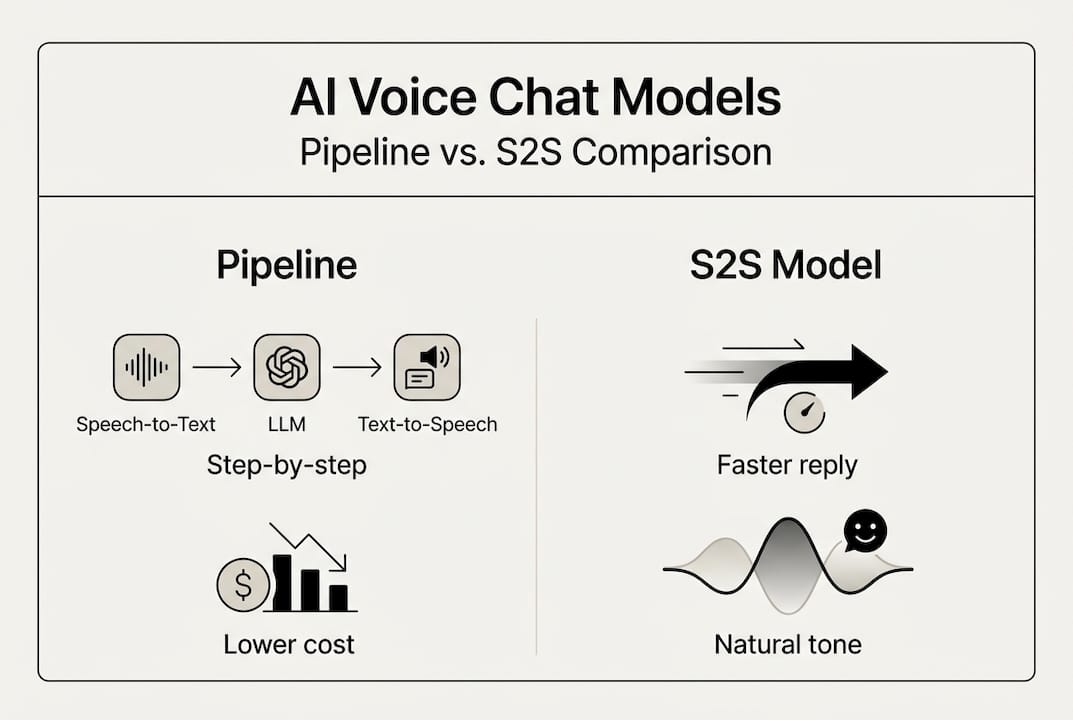
| Factor | Pipeline (STT + LLM + TTS) | S2S |
|---|---|---|
| Latency | ~1.1 seconds | <300ms |
| Cost | Lower | ~10x higher |
| Emotion transfer | Limited | Strong |
| Language support | Broad | Narrower |
| Tooling compatibility | High | Emerging |
| Interruption handling | Weak | Strong |
Pipeline offers flexibility and multi-language support but loses emotional nuance in translation. S2S excels at interruptions and emotional transfer, making it better for consumer-facing, conversational experiences.
When to choose each:
- Choose pipeline when you need broad language coverage, tight cost control, or compatibility with existing LLM tooling.
- Choose S2S when low latency and natural conversation flow are non-negotiable, such as in consumer apps or real-time support.
- Consider hybrid when you need the best of both, routing simple queries through S2S and complex reasoning tasks through pipeline.
Pro Tip: Hybrid architectures are gaining traction in production environments. Route emotionally sensitive or time-critical interactions through S2S, and use pipeline for tasks requiring structured reasoning or multi-language support. You can explore how S2S and pipeline methods compare in more detail.
Performance benchmarks and top 2026 AI voice models
Next, let's drill down into the facts: what do the latest benchmarks actually tell us, and which solutions lead in 2026?
Two metrics matter most when selecting a voice model. WER tells you how accurately the system transcribes speech. TTFA tells you how fast the first audio response arrives. Together, they define the user experience ceiling.
| Model | Provider | WER | TTFA |
|---|---|---|---|
| Scribe v2 | ElevenLabs | 2.3% | N/A |
| Gemini 3 Pro | 2.9% | N/A | |
| Sonic 3 | Cartesia | N/A | 40ms |
| GPT-4o Realtime | OpenAI | Competitive | <300ms |
ElevenLabs Scribe v2 leads STT at 2.3% WER, Gemini 3 Pro at 2.9%, and Cartesia Sonic 3 at 40ms TTFA. These are the benchmarks to beat in 2026.
One number that should give every team pause: voice model reasoning accuracy sits at roughly 10 to 12%. That's not a bug, it's a structural limitation of current voice models. Reasoning tasks belong in text pipelines for now.
How model choice impacts your application:
- Dictation and transcription: Prioritize WER. Scribe v2 is the current leader.
- Customer support bots: Balance WER and TTFA. Users notice both errors and delays.
- Real-time meeting tools: TTFA is critical. Cartesia Sonic 3 or GPT-4o Realtime are strong fits.
- Emotion-sensitive interactions: S2S models preserve tone better than any pipeline.
- Multi-language deployments: Pipeline with a strong STT model gives you more language coverage.
For a broader view of how these models fit into a productivity stack, the AI model productivity guide maps out the landscape clearly.
Practical applications for developers and business teams
Data and comparisons are essential, but true value comes from effective integration. Here are actionable scenarios and tips for your team.
Five high-impact applications for AI voice chat in 2026:
- Virtual assistants: Voice-enabled assistants handle scheduling, reminders, and information retrieval without requiring users to stop what they're doing.
- Live meeting support: Real-time transcription and AI-generated summaries reduce the cognitive load of note-taking during calls.
- Automated note-taking: S2S models capture and structure spoken notes with minimal latency, feeding directly into project management tools.
- Accessibility tools: Voice interfaces remove barriers for users with visual impairments or motor limitations, expanding your product's reach.
- Customer interaction: AI voice agents handle tier-1 support queries, freeing human agents for complex cases.
Business teams should prioritize end-to-end latency under 300ms for productivity use cases. Anything above that threshold creates noticeable friction.
Practical steps for integrating AI voice chat:
- Design for voice first: Don't retrofit a text interface. Voice interactions have different UX patterns, shorter responses, and more tolerance for ambiguity.
- Benchmark before you build: Test WER and TTFA with your actual audio conditions, not just lab benchmarks.
- Iterate on failure modes: Voice systems fail differently than text. Accents, background noise, and overlapping speech all degrade performance.
- Monitor latency in production: Lab benchmarks don't always reflect real-world network conditions.
For teams looking to scale, the guides on real-time AI business success and AI for productivity and collaboration offer practical frameworks for deployment.
Common pitfalls and future trends in AI voice chat
To wrap up, understanding where the technology is limited and where it's heading next is crucial for long-term success.
The three most common mistakes teams make with AI voice chat:
Overestimating reasoning accuracy. Voice models score around 10 to 12% on reasoning tasks. If your use case requires complex decision-making, route it through a text-based LLM, not a voice model.
Ignoring latency budgets. A 1.1-second pipeline delay feels fine in a demo. In a live customer interaction, it kills the experience. Set a latency budget before you choose an architecture.
Underestimating costs. S2S models can cost 10x more per interaction than pipeline equivalents. At scale, that difference is significant. Model your cost projections early.
"Hybrid approaches are emerging for production needs, balancing cost, control, and user experience in ways that neither pure pipeline nor pure S2S can achieve alone."
Looking ahead, the field is moving fast. Expect S2S models to close the reasoning gap, costs to drop as competition increases, and hybrid architectures to become the default for enterprise deployments. Multilingual S2S is also improving rapidly, which will matter for global teams.
Pro Tip: Benchmark your chosen models every quarter. The leaderboard shifts quickly, and a model that led in early 2026 may not be the best choice by year-end. The AI productivity best practices guide is a useful resource for staying current.
Unlock the power of AI voice chat with Sofia
If you're ready to move from theory to practice, Sofia gives you direct access to the leading STT, TTS, and S2S models discussed in this guide, all from a single platform.
Sofia integrates natural voice chat with speech recognition, real-time streaming responses, and over 60 AI models including GPT-4o, Claude 4.0, and Gemini 2.5. Whether you're a developer building a voice-enabled product or a business team looking to automate meetings and support workflows, Sofia provides the infrastructure to do it securely and at scale. GDPR compliance, enterprise encryption, and team collaboration tools are built in. You can start exploring AI voice chat in a real environment without stitching together multiple APIs or managing separate model subscriptions.
Frequently asked questions
What is the difference between S2S and STT-TTS pipelines?
S2S models convert audio input directly to audio output, cutting latency and preserving emotional tone, while pipelines use separate steps for transcription and synthesis, offering more flexibility and language support.
Which AI voice chat model has the lowest latency in 2026?
Cartesia Sonic 3 leads TTS at 40ms TTFA, and S2S models like GPT-4o Realtime achieve overall end-to-end latency under 300ms.
Is AI voice chat as accurate as text-based AI?
Not yet. Voice AI scores around 10 to 12% on reasoning tasks, compared to roughly 54% for text-based systems, making it better suited for conversational tasks than complex reasoning.
What are the main business benefits of AI voice chat?
AI voice chat enables hands-free, real-time interaction for meetings, customer support, and workflow automation, with latency under 300ms delivering a smooth, productive user experience.
How do I choose the right AI voice chat model?
Evaluate latency, cost, emotion support, and integration requirements first, then consider hybrid approaches that balance pipeline flexibility with S2S speed for production deployments.