
TL;DR:
- AI tools significantly improve student learning outcomes, especially for struggling and under-resourced learners.
- Responsible AI use involves guided, reflective practices to enhance skills without undermining critical thinking.
- Combining human effort with AI efficiency creates the most effective and ethical educational experiences.
Most students now use AI tools regularly, yet few realize just how deeply those tools can shape academic outcomes, for better and worse. 80-82% of students report that AI tools enhance their academic experience, a number that would have seemed impossible five years ago. But raw enthusiasm does not equal smart use. This guide separates the genuine advantages from the overhyped promises, walks you through the real evidence, and gives you a practical framework for using AI in ways that actually build your skills rather than quietly replacing them.
Table of Contents
- Understanding AI for students: core concepts and mechanics
- The real-world impact: Evidence and outcomes for students
- Limitations and risks: The other side of student AI
- Best practices: How to use AI responsibly and productively
- Why AI for students works best with guidance, not shortcuts
- Next steps: Start your AI-powered student journey
- Frequently asked questions
Key Takeaways
| Point | Details |
|---|---|
| AI boosts learning | AI tools help students improve grades, study more efficiently, and personalize their learning experience. |
| Responsible use matters | Blending AI with teacher guidance and reflection maximizes benefits and avoids critical thinking loss. |
| Choose the right tools | Popular student AI tools include ChatGPT, Grammarly, Otter.ai, and Notion AI for common academic needs. |
| Guard against overreliance | Students should verify AI outputs, balance with active learning, and watch for bias or reduced effort. |
Understanding AI for students: core concepts and mechanics
AI for students is not one single app or feature. It is a category of digital tools that personalize learning, automate repetitive study tasks, and give you feedback in real time. Think of it as a tireless study partner that never gets bored, never judges you for asking the same question twice, and adapts to your pace.
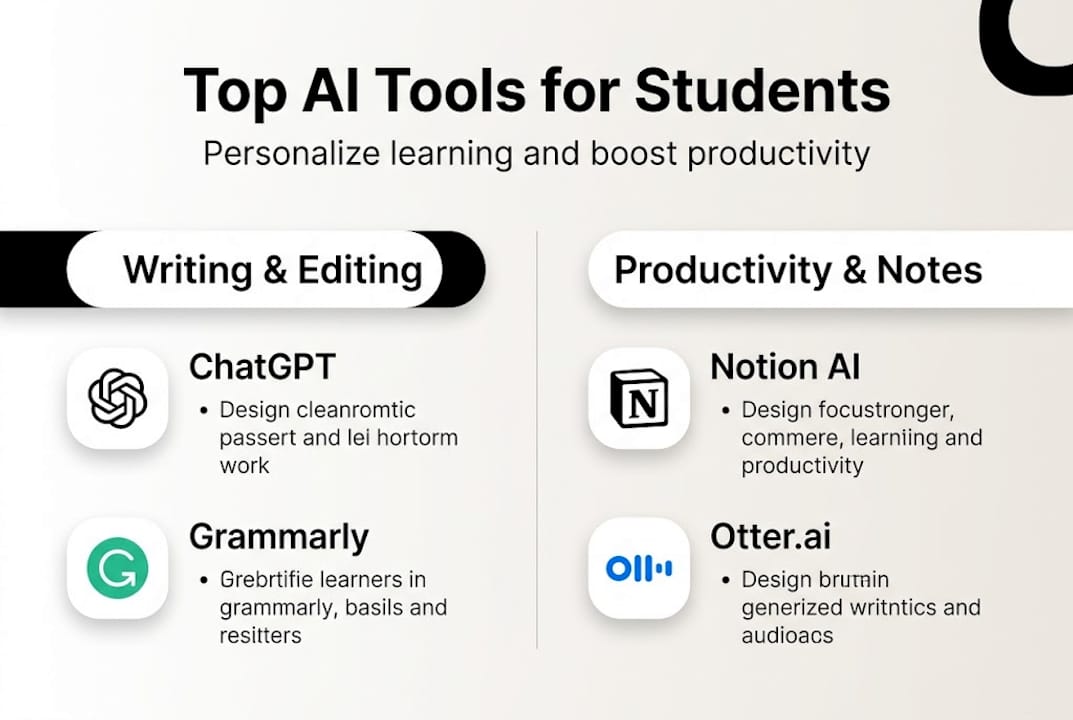
Some of the most widely used tools include ChatGPT, Gemini, Grammarly, Otter.ai, and Notion AI, each of which automates a different slice of academic work: explanations, editing, organization, and note-taking. The variety matters because no single tool covers every need.
Under the hood, most of these tools rely on a handful of core mechanics. Natural language processing, retrieval-augmented generation, agentic workflows, and prompt engineering are the building blocks that make AI responses feel conversational and contextually aware. You do not need to master these concepts to use AI well, but knowing they exist helps you understand why a well-crafted prompt gets a much better answer than a vague one. For a deeper look at how speech-based AI fits into this picture, check out how AI voice chat works.
Here is a simple four-step loop that describes how most students interact with AI daily:
- Understand: Ask the AI to explain a concept in plain language.
- Summarize: Have it condense a long reading into key points.
- Practice: Request quiz questions or worked examples.
- Revise: Submit a draft and ask for targeted feedback.
This loop mirrors the best study science has to offer: retrieval practice, spaced repetition, and elaborative interrogation. AI just makes those techniques faster to access.
| AI tool | Primary student use | Core mechanic |
|---|---|---|
| ChatGPT | Explanations, writing | Large language model |
| Grammarly | Grammar, style editing | NLP + rule-based AI |
| Otter.ai | Lecture transcription | Speech recognition |
| Notion AI | Note organization | Generative AI |
| Microsoft Copilot | Productivity, research | RAG + LLM |
"The real power of AI in education is not replacing thinking. It is scaffolding the thinking process so students can go further than they could alone."
For a broader foundation on how these systems are built, the AI model basics guide is a useful next read. Research on AI-powered assessment also shows how these tools are moving beyond simple Q&A into grading and feedback roles.
The real-world impact: Evidence and outcomes for students
With these foundations in place, let's see whether the promises hold up to real-world evidence, and who benefits the most.
The numbers are striking. AI tutors improved math grades by 48-127%, with a 0.31 standard deviation gain in English and a 0.56 Cohen's d effect size overall. To put that in context, a 0.56 Cohen's d is considered a medium-to-large effect in education research, roughly equivalent to moving a student from the 50th to the 71st percentile.
Who benefits the most? The evidence from K-12 studies consistently points to three groups:
- Students who were already struggling academically
- Learners in under-resourced schools with limited teacher support
- Students working on specific, well-defined tasks like math problem sets or grammar exercises
The gains are not evenly distributed across all subjects or all learners, which is an important nuance. AI tends to shine brightest where the task is clear and the feedback loop is tight.
| Learning method | Grade improvement | Engagement boost |
|---|---|---|
| Traditional instruction | Baseline | Baseline |
| Active learning | Moderate | Moderate |
| AI-assisted learning | High (48-127% in math) | High |
| Hybrid (AI + teacher) | Highest | Highest |
Survey data reinforces the quantitative findings. 80-82% of students see enhanced experience with AI tools, and personalized AI assessment correlates at 0.847 with expert human graders, which is remarkably close alignment. That means AI feedback is nearly as reliable as a trained teacher's eye for many types of tasks.
Longitudinal studies add another layer: the benefits do not fade quickly. Students who use AI tools consistently over a semester show narrowing performance gaps compared to peers, and female students and low performers tend to see the largest boosts. Hybrid note-taking, where students use AI transcription alongside their own notes, outperforms AI-only note-taking on retention tests. The takeaway is clear: AI works best as an amplifier of your own effort, not a replacement for it. Connecting these findings to broader AI productivity outcomes shows that the same principles apply far beyond the classroom. Tools that support AI for study efficiency through document analysis can further extend these gains.

Limitations and risks: The other side of student AI
Of course, not every headline about AI for students is a glowing one. Here is what the data and concerned voices reveal about drawbacks and dangers.
The most alarming finding comes from a natural experiment: unguarded AI use led to a 17% grade drop when the tools were removed, suggesting students had outsourced thinking rather than built skills. Overreliance reduces metacognition, which is your ability to monitor and regulate your own learning. When AI does the heavy lifting, you stop developing the mental muscles that exams and real-world problems demand.
Students themselves sense this risk. 68% of students worry AI will erode their critical thinking, and faculty express nearly identical concerns. That shared anxiety is actually a healthy sign. It means the conversation about responsible use is happening.
Here are the key risk areas to watch:
- Overreliance: Using AI to generate answers instead of working through problems
- Reduced metacognition: Skipping the self-check step because AI already checked
- Bias in outputs: AI models can reflect biases present in their training data
- Privacy concerns: Submitting sensitive personal or academic data to unvetted platforms
- Academic integrity: Submitting AI-generated work as your own without disclosure
"The guardrails matter as much as the tool itself. Structured guidance from teachers consistently erases the negative effects of unguided AI use."
The good news is that teacher-guided AI use consistently eliminates most of these risks. When instructors set clear boundaries, teach AI literacy and safe use, and build reflection into assignments, the negative outcomes largely disappear. STEM subjects and early education stages carry the highest risk of overreliance, largely because those domains require building foundational skills that AI can too easily bypass.
Pro Tip: After every AI-assisted study session, write two or three sentences in your own words summarizing what you learned. This simple habit rebuilds the metacognitive loop that AI can short-circuit. For more structured guidance, the AI usage best practices and AI privacy for students guides are worth bookmarking.
Best practices: How to use AI responsibly and productively
So how can students harness AI's power without falling into its pitfalls? Here are research-backed best practices for everyday academic life.
Ethical, scaffolded use and AI literacy are the two factors that consistently predict positive outcomes. Scaffolded use means you set up guardrails before you start, not after something goes wrong.
Follow this step-by-step approach:
- Choose the right tool for the specific task. Use Grammarly for editing, not for generating your argument.
- Set guardrails before you start. Decide what you will ask AI to do and what you will do yourself.
- Verify every output. Treat AI answers like a first draft from a smart but fallible classmate.
- Combine with active learning. After AI explains a concept, close the tab and explain it back in your own words.
- Reflect after each session. Ask yourself: what did I actually learn, and what did AI do for me?
The traffic light framework is a simple mental model for deciding when AI is appropriate:
- Green (use freely): Brainstorming, grammar checks, formatting, transcription
- Yellow (use cautiously): Drafting arguments, summarizing sources, generating examples
- Red (do not use): Exams, assessments designed to test your independent thinking, original creative work
Pro Tip: When you get an AI explanation, immediately ask it a follow-up question that challenges its answer. This keeps your critical thinking active and often reveals gaps or oversimplifications in the original response.
A few additional habits that protect your learning:
- Tell your teacher when and how you used AI on an assignment
- Cross-reference AI-generated facts with at least one primary source
- Use AI to generate practice questions, then answer them without AI help
For a full breakdown of responsible habits, the best AI practices guide covers both student and professional contexts.
Why AI for students works best with guidance, not shortcuts
Here is a perspective you do not always hear: AI did not create the critical thinking problem in education. It exposed one that was already there.
Poor pre-existing practices are the culprit, and structured guidance is what unlocks genuine gains. Students who struggle with AI overreliance typically struggled with passive learning long before AI arrived. They highlighted textbooks without processing the content. They copied notes without synthesizing them. AI just made the shortcut faster and more visible.
The real opportunity is different. When you use AI consciously, with reflection built in, it forces you to confront gaps in your understanding that traditional studying let you paper over. A good AI interaction is not one where you get the answer. It is one where you realize you did not fully understand the question.
The best outcomes we see come from hybrid models: human curiosity paired with AI speed, teacher expertise paired with AI availability, and student resilience paired with AI patience. Exploring AI for collaboration shows how this human-plus-AI dynamic scales beyond individual study into team and professional settings. The pattern holds everywhere: AI amplifies what you bring to it.
Next steps: Start your AI-powered student journey
You now have a clear picture of what AI for students actually means, what the evidence says, and how to use these tools without undermining your own growth. The next step is putting it into practice with tools you can trust.
Sofia🤖 gives you access to over 60 leading AI models, including GPT-4o, Claude 4.0, and Gemini 2.5, all in one secure platform built with GDPR compliance and enterprise encryption. Whether you need document analysis for research papers, voice chat for hands-free studying, or real-time feedback on your writing, Sofia🤖 brings it together without the hassle of juggling multiple apps. Start exploring SofiaBot AI tools today and build the study habits that actually stick.
Frequently asked questions
What are the best AI tools for students in 2026?
Leading options include ChatGPT for writing and brainstorming, Grammarly for editing, Otter.ai for lecture transcription, Notion AI for organization, and Microsoft Copilot for productivity. Each tool targets a different part of the student workflow, so the best choice depends on your specific academic needs.
Does using AI improve student grades?
AI tutors can boost grades by 48-127%, especially in math and English, with effect sizes that outperform most traditional and active learning methods. The gains are largest for struggling students and those in under-resourced settings.
Is it safe for students to rely on AI for assignments?
Guarded use with teacher guidance is generally safe, but overreliance reduces critical thinking and metacognition over time. Reflection, ethical disclosure, and structured guardrails are essential for protecting your learning.
How can students use AI responsibly?
Combine AI with active recall, verify every output against a primary source, and apply the traffic light framework to decide when AI is appropriate. Scaffolded use and AI literacy consistently produce the best and most ethical outcomes.